Automated Prompt Discovery: Find the Right Questions to Track in AI Search
A practical guide to discovering which prompts to track in Superlines — from manual import strategies to fully automated prompt discovery using Prompt Radar, Google Search Console, and MCP-powered agent workflows.


Table of Contents
Why prompt selection matters
The prompts you track in Superlines define your entire AI search intelligence context. They determine which competitive data you see, which content gaps surface, and what strategic actions the platform recommends. Getting this right is the difference between actionable intelligence and noise.
The challenge is real: manually selecting prompts risks tracking questions nobody actually asks. But exact keyword matching does not apply here — AI search is conversational, and people phrase the same intent in many ways. What matters is covering the intent clusters that drive visibility for your brand.
This guide covers three approaches to prompt discovery, from manual to fully autonomous, so you can choose the right level of automation for your team.
Approach 1: Import from existing data
If your organization already has marketing, support, or SEO data, you have a head start. These internal sources contain the exact language your customers use, which maps directly to the prompts AI models receive.
What to import
| Source | What it contains | How to use it |
|---|---|---|
| Marketing messaging frameworks | Key value propositions, competitive differentiators, buyer persona questions | Import as strategic prompts organized by brand and persona |
| FAQ databases | Real questions customers ask repeatedly | Import directly — these mirror how users query AI models |
| Support ticket data | Pain points, product questions, how-to requests | Extract recurring themes and convert to prompt format |
| SEO keyword data | High-volume search terms, long-tail keywords | Transform keywords into conversational prompts using AI |
| Sales enablement content | Objection handling, comparison questions | Import as competitive tracking prompts |
How to import
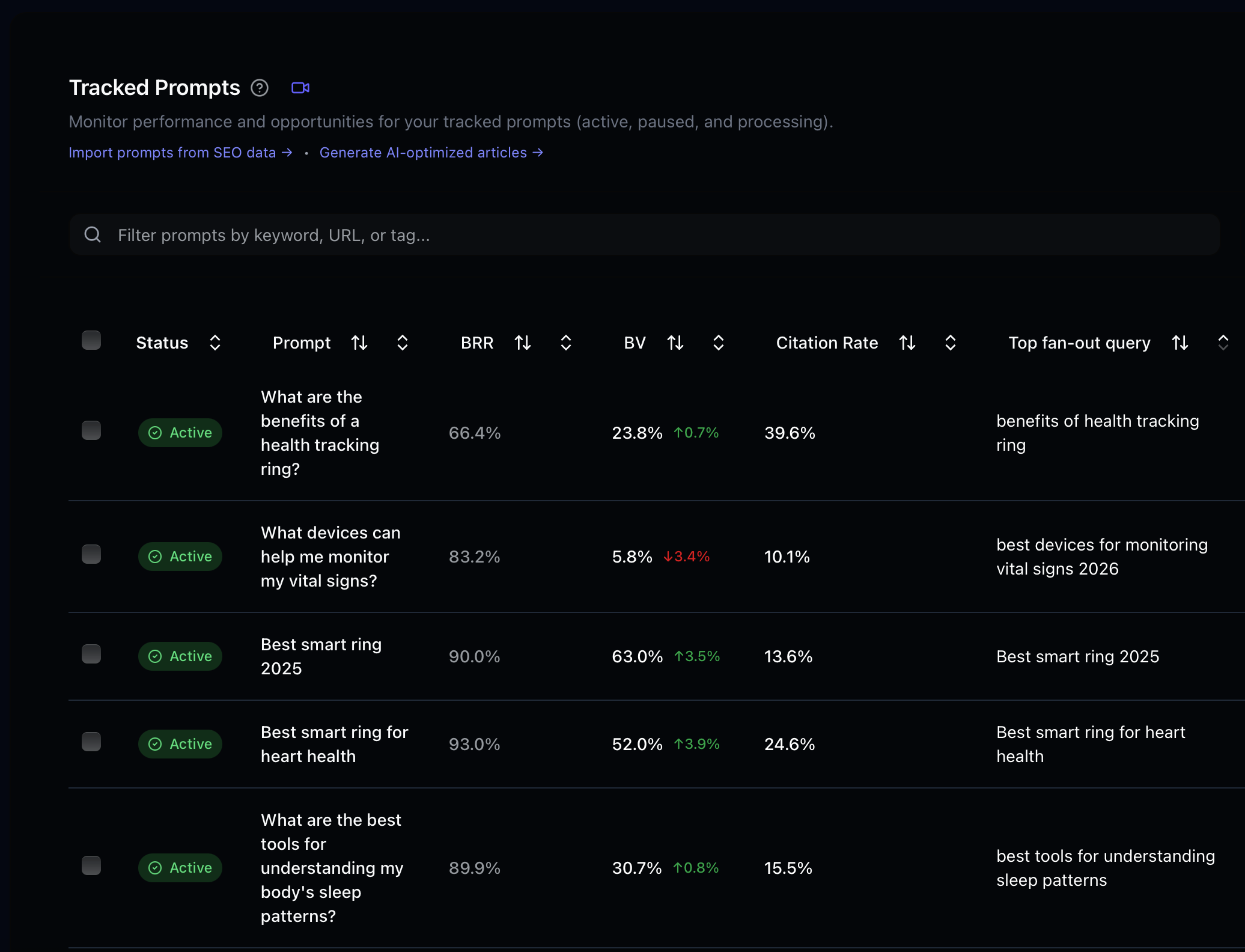
Use the Prompt Import workflow in Superlines at /prompt-import. This is the main bulk import UI for getting prompts into tracking.
The import wizard supports four sources:
| Source tab | Best for |
|---|---|
| CSV Upload | Large prompt lists exported from SEO, support, or content tools |
| Text Input | Pasting a quick batch of prompts or keywords directly into Superlines |
| Webpage URLs | Extracting prompt ideas from landing pages, help centers, or competitor pages |
| Google Search Console | Importing real search queries once Search Console is connected |
For supported sources, you can choose between:
- Generate AI-enhanced prompts when you want Superlines to turn keywords or raw inputs into more natural conversational prompts
- Import as raw prompts when you already have prompts in the exact phrasing you want to track
After import, organize prompts with labels to keep your tracking structured:
- By funnel stage — awareness, consideration, decision
- By topic cluster — pricing, features, comparisons, how-to
- By competitor — prompts where specific competitors appear
- By priority — strategic prompts you must win vs. monitoring prompts
Using MCP to bulk-add prompts
If you have a large dataset, the MCP server can accelerate this. In Claude Desktop or Cursor with the Superlines MCP connected:
I have a list of 50 keywords from our SEO tool. Convert each one into a
natural conversational prompt that someone would ask an AI assistant, then
add them all to Superlines tracking for [Brand Name] with the label
"seo-import-feb-2026".

Here are the keywords:
[paste your keyword list]
The AI assistant will convert keywords like “best CRM software small business” into natural prompts like “What’s the best CRM software for a small business?” and add them via the add_prompts MCP tool.
Approach 2: Prompt Radar — automated discovery
Prompt Radar is a Superlines feature that automatically identifies trending prompts relevant to your brand that you are not yet tracking. It works by analyzing SEO, SERP, and People Also Ask (PAA) data sources to find questions with real search volume and AI search relevance.
How Prompt Radar works
- Superlines analyzes your existing tracked prompts and brand context
- It cross-references SEO, SERP, and PAA data to find related questions with proven search demand
- It filters out prompts you already track
- It surfaces new prompt suggestions ranked by estimated relevance
When to use Prompt Radar
Prompt Radar is especially valuable for teams that:
- Don’t have large internal datasets to seed their prompt portfolio
- Want to discover “hot” prompts — trending questions where AI search visibility matters most
- Need to expand beyond their current tracking into adjacent topic areas
- Want to ensure they’re not missing high-volume prompts that competitors are winning
Accessing Prompt Radar
- Log in to analytics.superlines.io.
- Open Prompts in the left sidebar.
- Click Prompt Radar or go directly to
/automated-insights.
Prompt Radar does not need a separate enable/disable toggle in Organization Settings. It is a dedicated page that surfaces suggested prompts based on SEO, SERP, and PAA data. Review the suggestions on the Prompt Radar page itself and use the + button to add the ones that fit your strategy to tracking.
Check Prompt Radar suggestions at least once a week — new trending queries appear as they gain SEO/SERP volume, and the list refreshes automatically.
Approach 3: Google Search Console integration
Google Search Console (GSC) provides a direct signal of what real users search for when they find your website. Importing high-performing GSC queries as prompts creates a bridge between your traditional search performance and AI search tracking.
What to look for in GSC data
| GSC signal | Why it matters for AI search |
|---|---|
| High impressions, low clicks | People see you in search but don’t click — these queries likely also appear in AI search where click behavior differs |
| High click queries | Your proven performers — track these in AI search to protect your position |
| Rising queries | Emerging demand signals — get ahead by tracking these before competitors |
| Question-format queries | Already in conversational format — import directly as AI search prompts |
Connect Google Search Console
- Log in to analytics.superlines.io.
- Go to Integrations in the left sidebar.
- Scroll to Add New Integration.
- Under Search Console, click Connect.
- Sign in with the Google account that has access to your Search Console property.
- Select the GSC property (website) you want to connect and click Authorize.
Use the Search Console connect flow directly from the Integrations page for this setup. Once connected, the Google Search Console tab in Prompt Import becomes available so you can import query data into tracking.
Import workflow
After connecting GSC:
- Go to Prompt Import at
/prompt-import. - Open the Google Search Console tab.
- Review the available queries and apply the signals above — prioritize high-impression/low-click queries and question-format queries.
- Choose whether to Generate AI-enhanced prompts or Import as raw prompts.
- Import the queries you want to track.
- Optionally add a label like
source:gscso you can filter analytics by source later.
Approach 4: MCP-powered autonomous discovery
The most advanced approach combines external data sources with the Superlines MCP server in an automated agent workflow. This is ideal for teams that want continuous prompt discovery without manual effort.
The discovery flow
External Data Source          AI Agent              Superlines
(SERP scraper, keyword       (Claude, Cursor,      (MCP Server)
 tool, GSC API)              custom agent)

     │                            │                      │
     │  1. Fetch trending         │                      │
     │     keywords/queries       │                      │
     ├───────────────────────────►│                      │
     │                            │                      │
     │                            │  2. Check which      │
     │                            │     prompts are      │
     │                            │     already tracked  │
     │                            ├─────────────────────►│
     │                            │◄─────────────────────┤
     │                            │                      │
     │                            │  3. Analyze gaps:    │
     │                            │     which trending   │
     │                            │     queries are      │
     │                            │     missing?         │
     │                            │                      │
     │                            │  4. Add new prompts  │
     │                            │     to tracking      │
     │                            ├─────────────────────►│
     │                            │                      │
Example: SERP-driven prompt discovery
If you have a SERP scraper MCP server (like DataForSEO or Bright Data) connected alongside Superlines, you can run this workflow in Claude Desktop:
Step 1: Use the SERP tool to find the top 20 trending search queries
in the "[your industry]" category for [your country] this month.

Step 2: For each query, check with Superlines whether we're already
tracking a similar prompt for [Brand Name].

Step 3: For any trending queries that we're NOT tracking, convert them
into natural conversational prompts and add them to Superlines with the
label "serp-discovery-feb-2026".

Step 4: Summarize what you added and why each prompt matters.
Example: Keyword-to-prompt conversion
Long-tail keyword data from SEO tools can be transformed into AI search prompts at scale:
I have keyword data with search volumes from our SEO tool. For each keyword
with monthly search volume above 500:

1. Convert it into 1-2 natural conversational prompts that a user would
   ask an AI assistant
2. Check if we're already tracking similar prompts in Superlines for
   [Brand Name]
3. Add any new prompts with the label "keyword-discovery" and include
   the original keyword and search volume in the notes

Keywords:
[paste keyword data with volumes]
Approach 5: Prompt Variations — test phrasing sensitivity
Prompt Variations is a Superlines feature that automatically tests different phrasings of the same tracked prompt without counting against your quota. Instead of tracking only “Where can I easily get YEL insurance?”, Superlines also tests “Tell me where I can easily buy YEL insurance?” and records results for both phrasings separately.
This matters because AI engines do not treat identical intent the same way when the phrasing changes. Your brand might appear in 60% of responses to “What is the best AI search visibility tool?” but only 20% of responses to “Which AI search visibility tools do marketers recommend?” — despite the queries meaning essentially the same thing. Prompt Variations reveals these blind spots.
When to use Prompt Variations
- You are uncertain whether your current tracked prompts capture the full range of how users phrase questions
- You want to know whether your visibility is robust across phrasing changes or fragile (depends on one specific wording)
- You are tracking high-stakes prompts — conversion-intent or category-defining queries — where a phrasing gap would be costly
Enabling and configuring Prompt Variations
At the organization level:
- Log in to analytics.superlines.io.
- Go directly to
/organization-settings. - Scroll to the Prompt Variations section.
- Toggle on Enable Prompt Variations.
- Set the variation rate — the recommended starting point is 25%, meaning 1 in 4 crawl cycles tests an alternate phrasing.
/organization-settings is separate from Brand Settings, so use the direct route if you do not see it in the sidebar navigation.
At the brand level, you can override the organization default:
- Open Brand Settings for the brand you want to customize.
- Turn on Override Organization Setting.
- Turn on Enable Prompt Variations for that brand.
- Adjust the variation rate slider for the brand-specific setting.
This is useful if you have one brand where phrasing sensitivity is a priority and others where it is not.
Reading variation results
Variation results are tagged separately in all analytics views and API exports. In your analytics, you will see the base prompt and its variations tracked independently, allowing you to compare:
| Prompt | Variation | Brand Visibility | Citation Rate |
|---|---|---|---|
| ”Best AI search tracking tools” | base | 8.2% | 4.1% |
| “Best AI search tracking tools” | variation | 3.7% | 1.9% |
A large gap between base and variation signals phrasing fragility — your visibility depends on the specific wording you happen to be tracking. The fix is to optimize your content to match the language used in the variation phrasing, or to add the variation as its own tracked prompt.
Interpreting phrasing gaps
| Pattern | What it means | Action |
|---|---|---|
| Variation BV much lower than base | Content matches one phrasing but not the other | Optimize headings to match both phrasings, or add the variation as a tracked prompt |
| Variation BV similar to base | Robust visibility — not dependent on specific wording | Low priority; focus elsewhere |
| Variation BV higher than base | You are stronger in the variation phrasing | Update your base tracked prompt to the more effective wording |
Variation results do not count toward your prompt quota. They are generated and tracked at no additional quota cost.
Building a continuous discovery system
The most effective prompt strategy combines all four approaches into a continuous cycle:
Weekly rhythm
| Day | Action | Approach |
|---|---|---|
| Monday | Review Prompt Radar suggestions, add relevant ones | Automated discovery |
| Wednesday | Review Search Console queries in Prompt Import, import new ones | GSC integration |
| Friday | Run MCP agent to cross-reference external keyword trends | Autonomous discovery |
Monthly review
- Audit prompt performance — Use
get_best_performing_promptto find your top performers andget_competitive_gapto find where you’re losing - Prune low-value prompts — Remove prompts with zero relevance to your business
- Expand into adjacent topics — Use fan-out query data to discover related topics AI models associate with your prompts
- Update labels — Keep your organization system clean as the portfolio grows
MCP automation prompt for monthly review
Run a complete prompt portfolio health check for [Brand Name]:

1. List our top 10 best-performing prompts and why they're working
2. List prompts where we've lost visibility in the last 30 days
3. Show fan-out queries from our top prompts that reveal topics we're
   not yet tracking
4. Recommend 10 new prompts to add based on competitive gaps and
   content opportunities
5. Recommend any prompts to archive (low volume, no competitive relevance)
What comes after discovery
Once you have the right prompts tracked, the real power of Superlines unlocks:
- Fan-out query intelligence reveals what AI models actually search for when answering your prompts — see our Fan-Out Query Competitive Intelligence guide
- Competitive gap analysis shows where competitors are winning and what content earns them citations
- Content pipelines can be built on top of this intelligence to automatically create optimized content — see our Agentic AEO Content Pipeline guide
- Automated workflows chain these insights together for continuous optimization — see Automate GEO Analysis and Content Creation
The prompts you track are the foundation. Everything that follows — competitive intelligence, content strategy, autonomous optimization — depends on getting this right.