


The best GEO analytics tools in 2026 include Superlines, Profound, Peec AI, AthenaHQ, Semrush, Otterly.AI, Scrunch, Writesonic, Atomic AGI and XFunnel. They differ in analytical depth, engine and market coverage, reporting, recommendations and how well they support your team's way of working.
GEO analytics measure how your brand and website appear inside AI-generated answers. Good GEO analytics should show whether you appear, where you appear, how you are framed and what is shaping the answer, then help you decide what to do next.
This comparison helps marketers and marketing leaders choose a platform for their brands, markets, competitors and reporting needs. The order is for readability, not a universal best-to-worst ranking. Each platform is better suited to different teams, use cases, budgets and workflows, so the most suitable choice depends on your requirements.
TL;DR: Which GEO analytics tool should you shortlist?
- Superlines is best suited to enterprise marketing teams and agencies that need to understand not only whether they appear in AI Search, but why competitors are winning and what to do next across multiple brands and markets.
- Profound is a strong enterprise shortlist when answer analytics, shopping visibility and marketing-agent workflows need to sit together.
- Peec AI is a strong shortlist for marketing teams focused on brand visibility, positioning and competitor/source analysis.
- AthenaHQ suits teams that want source intelligence alongside optimization workflows. Semrush suits teams combining AI visibility research with their existing SEO work.
- Otterly.AI is worth considering for an affordable daily monitoring start. Scrunch, Writesonic and Atomic AGI offer different combinations of monitoring, site analysis and execution. XFunnel requires an availability check following its transition into HubSpot.
Quick comparison of the best GEO analytics tools
Prices below use each vendor's stated currency and billing basis. Starting plans include different amounts of monitoring, reporting and access, so headline price alone is not a value ranking.
How we evaluated the tools
We prioritized visibility, positioning and sentiment; citations and sources; competitor analysis; engine and market coverage; multi-brand and multi-market support; reporting and exports; API, MCP and workflow access; recommendations; and the pricing, trial or demo route. We used company websites and documentation to compare capabilities, rather than assigning numerical scores or claiming a controlled performance benchmark. Superlines publishes this comparison and is included in it.
We compare all ten platforms using the same buyer-oriented criteria. Rather than treating the list order as a universal ranking, each review explains the teams and use cases the platform is best suited to, plus the restrictions that could change the buying decision.
Vendor information, pricing and availability were checked against each company’s website and documentation on 8-9 October 2026. Plans and features can change, so check the vendor’s current site for the latest details.
Top 10 GEO analytics tools in 2026
1. Superlines
Best for: Enterprise marketing teams and agencies managing AI Search across brands and markets.
Superlines is an AI Search analytics and intelligence platform for enterprise marketing teams and agencies. It is particularly well suited to teams that need to understand not only whether they appear in AI Search, but why competitors are winning and what to do next across multiple brands and markets. Its combination of granular measurement, competitive and source intelligence, Action Center recommendations, and flexible reporting and data access distinguishes it from a monitoring-only dashboard.
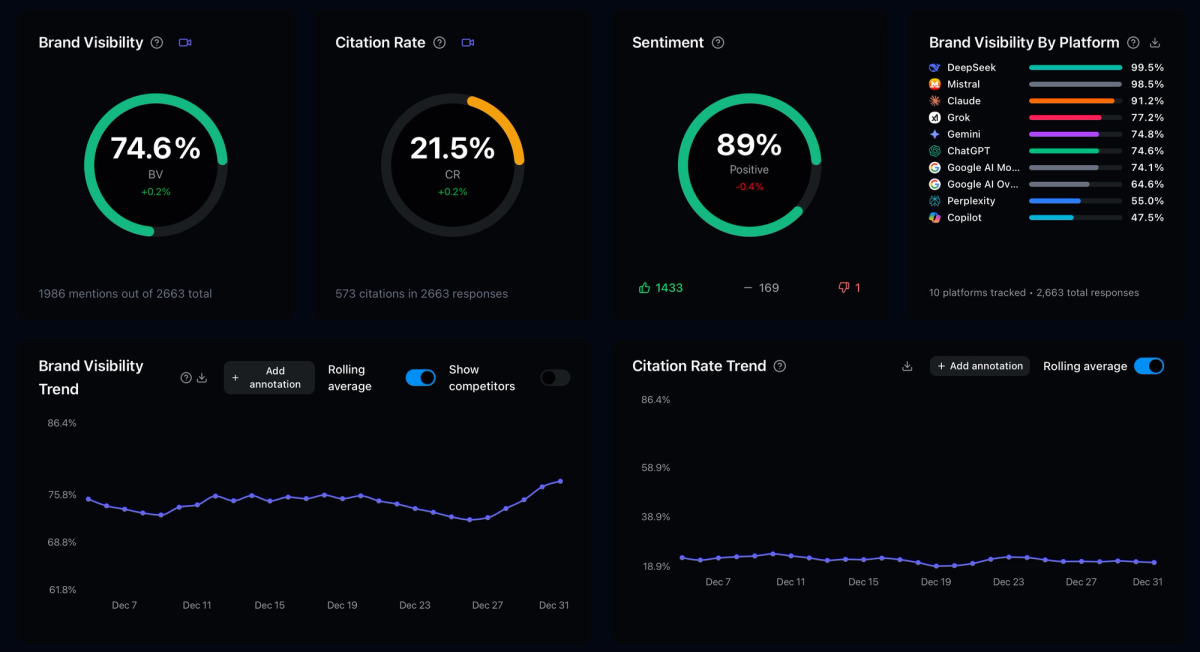
Standout strengths and analytics: It combines prompt-level answers with Brand Visibility, Citation Rate, Sentiment, positioning and Share of Voice. Multi-brand and multi-market views help teams compare performance across countries, languages and engines without relying on a single composite score. Superlines collects data from user-facing AI Search interfaces, so the answers collected reflect the user-facing experience in each tracked market.
Competitors and sources: Analyze competing brands, source domains and cited URLs to identify where competitors appear and which pages recur. Fan-out queries reveal related queries AI systems generate and explore behind the scenes, helping teams understand the questions and sources that may shape an answer. The Action Center organizes recommendations around visibility, citations, content and technical opportunities.
Reporting and access: Teams can work in the UI, use CSV, Excel and JSON exports, or connect data to their own dashboards and AI-assisted workflows through API and MCP.
Limitations: Brand allowances, engine count and history depend on the package. Starter has one month of history and no exports or API; exports begin on Pro, API on Growth, and MCP is listed across plans. Choosing from the supported engine catalog does not mean every plan monitors every engine simultaneously.
Pricing and evaluation: Monthly brand plans list Starter at €79 for 50 prompts and three selected engines, Pro at €199 for 150 prompts, and Growth at €379 for 300 prompts. Enterprise is custom, with up to ten engines and unlimited brands. Agency plans have separate client-brand allowances. A seven-day free trial and tailored demo are available.
2. Profound
Best for: Large enterprises and Fortune 500-scale organizations running broad, sales-led AI Search programs across answer analytics, shopping visibility and marketing-agent workflows.
Profound combines Answer Engine Insights with shopping analysis, Agent Analytics and AI Marketer workflows. It is particularly relevant to large enterprise programs: Profound says it serves more than 700 enterprises, including over 10% of the Fortune 500. Its Enterprise tier is custom-priced, making it a stronger fit for organizations prepared for a sales-led deployment than teams primarily comparing low-cost self-service tools.
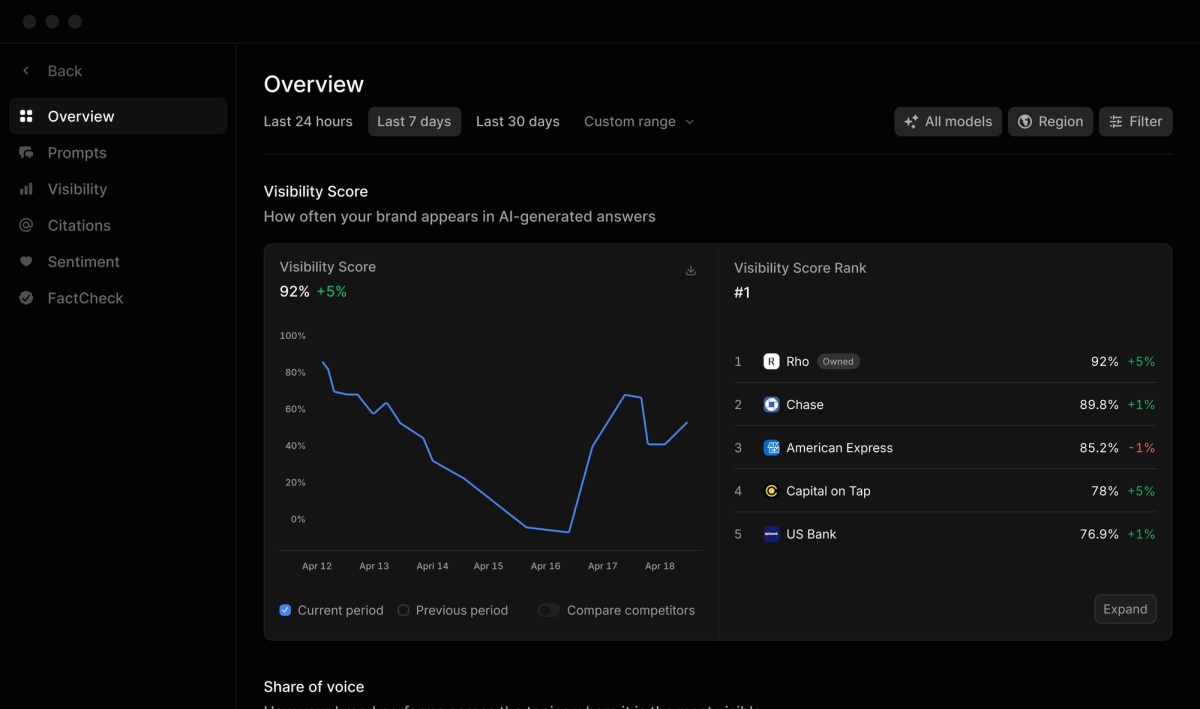
Standout strengths and analytics: Its Answer Engine Insights product tracks citations alongside brand and competitor performance. Source categories help separate owned pages, competitor content and earned coverage, making it easier to decide which pages or publishers deserve attention.
Competitors and sources: Citation tracking supports comparison across prompts and answer engines, plus identification of frequently cited publishers and authors. This is useful for content and PR teams investigating where competitors gain exposure. Shopping is a distinct capability to evaluate if your team needs product-level analysis.
Reporting and access: Enterprise lists CSV/JSON exports, API access and all-time history. Its broader agent workflows can support recurring marketing tasks, but buyers should specify the analytics records and reporting outputs they need.
Limitations: The free trial uses a recommended prompt set that cannot be customized. It covers one region and language, with no exports, API or history listed. A tailored demo is therefore more useful for testing custom prompts, regional reporting or data integrations.
Pricing and evaluation: The current pricing page lists a free trial with 50 prompts run daily for seven days across ChatGPT, Gemini and Google AI Overviews. Enterprise pricing is custom, with up to nine answer engines and tailored prompt tracking.
For a focused enterprise shortlist, see our Profound alternatives guide.
3. Peec AI
Best for: Marketing teams prioritizing brand positioning and competitor/source analysis.
Peec AI is a marketing-focused AI Search analytics platform. Its emphasis on visibility, position, sentiment and source gaps makes it a strong option when the main job is understanding how a brand compares with competitors inside AI answers.
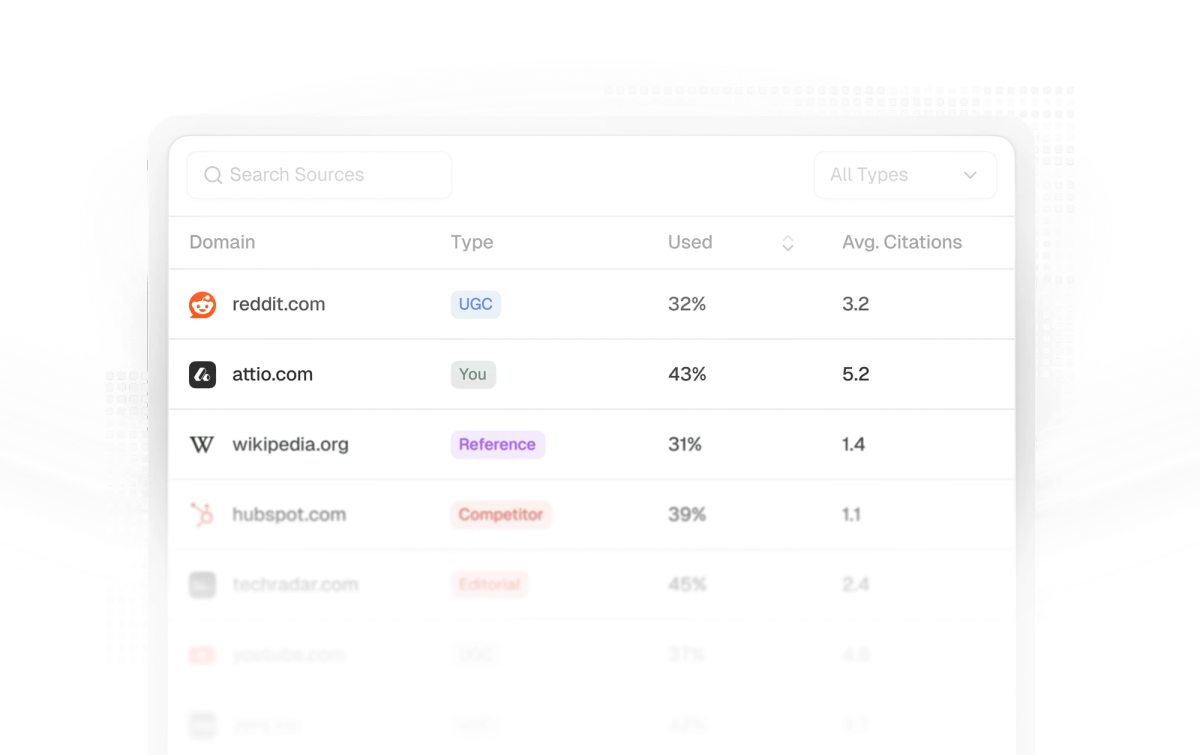
Standout strengths and analytics: Peec's product documentation describes chat-level response records, engine comparisons and brand insights across topics and geographies. Prompt tags help organize analysis around categories, campaigns or markets. Peec also documents recommendations and query fan-outs, so it should not be described as monitoring-only.
Competitors and sources: Domain- and URL-level gap analysis identifies sources associated with competitor visibility. It distinguishes accessed sources from visible citations, which matters when deciding whether a page was actually cited. These views can help content and PR teams choose specific pages or publications to investigate.
Reporting and access: CSV exports, Looker Studio, API and MCP are documented. Availability differs by package and between brand and agency offers. Confirm the access methods needed for recurring reports before choosing a plan.
Limitations: Model, project and regional allowances affect deployment. The live pricing page and its AI-instructions page do not present every entitlement consistently, so avoid assuming unlimited multi-country tracking or API/MCP access on an entry plan.
Pricing and evaluation: Peec's official plan reference lists brand plans at $95/month for Starter, $245 for Pro and $495 for Advanced, with custom Enterprise. The live pricing page lists Starter with 50 prompts, three chosen models and one project, and offers a free-trial route. Confirm the current checkout price and trial terms; agencies have a separate offer.
4. AthenaHQ
Best for: Teams combining source intelligence with guided optimization workflows.
AthenaHQ combines AI Search monitoring, source analysis, recommendations and content workflows. It is a useful shortlist when the team wants to investigate visibility and move into proposed content or outreach actions within the same product.
For reasons to stay, switch or migrate, compare AthenaHQ alternatives.
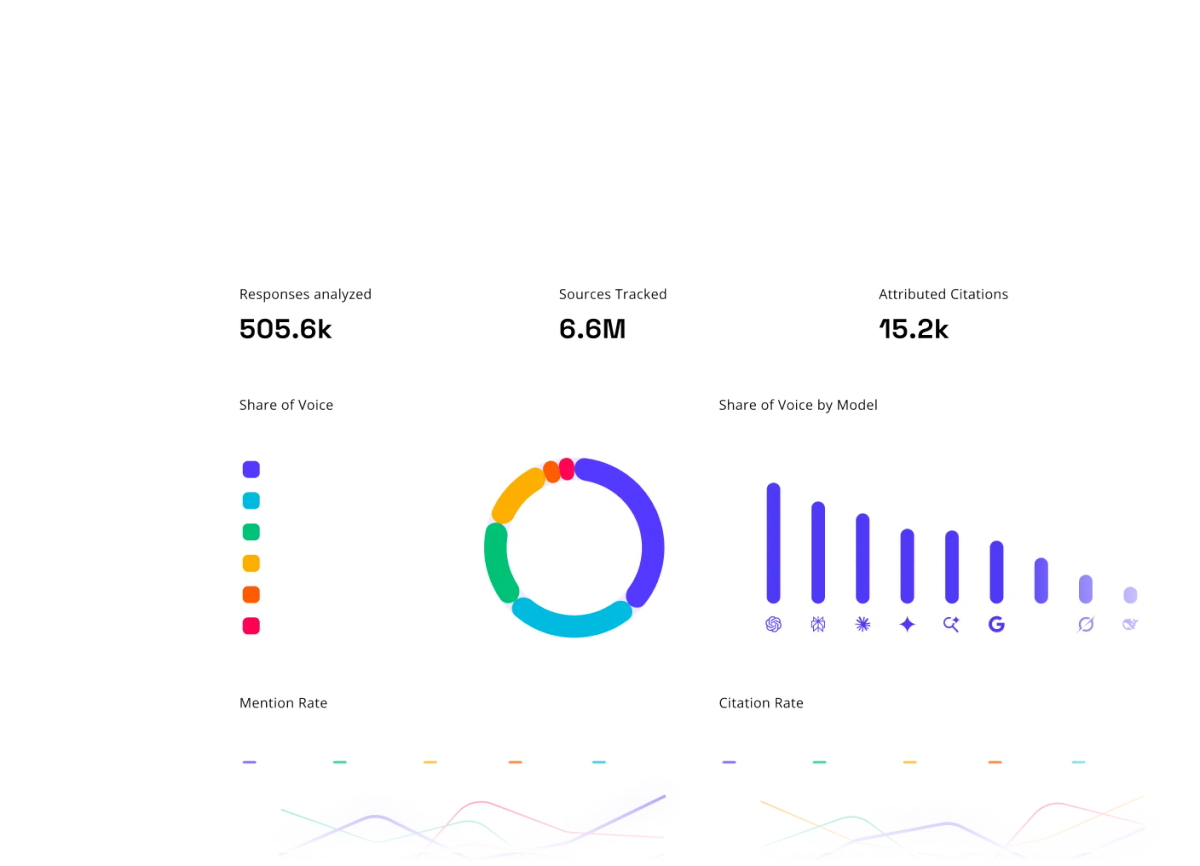
Standout strengths and analytics: Athena documents prompt/response analysis, competitor insights and sentiment monitoring. Its Sources Visualization maps cited sources to engines and mentioned brands, with filters and saved views. That can help marketers explore which sources recur alongside competitors.
Competitors and sources: The source view supports domain and URL investigation and drilldown into related responses. Use the relationships to find content or coverage opportunities; the diagram does not establish that a source caused a recommendation.
Reporting and access: Starter lists CSV exports and integrations. API access is a paid add-on on Starter and included in Enterprise. Enterprise also lists executive dashboards with BI support, multi-region/language analysis and tailored views.
Limitations: Starter is listed as single-region/language, while multiple-country support and advanced dashboard views are Enterprise features. Its credit model requires a quote for the intended engines, prompts and run frequency; one credit represents one AI response.
Pricing and evaluation: Athena's plans list a free Essential option with 300 credits, Starter at $295/month with 3,600 credits, and custom Enterprise. Starter advertises visibility across eleven models. Additional credits and API access cost extra on Starter. A demo route is available; the free credit allocation is not an unlimited monitoring plan.
5. Semrush AI Visibility Toolkit
Best for: SEO teams adding AI visibility research and tracking to their existing stack.
Semrush's AI Visibility Toolkit combines broader AI discovery research with brand-performance analysis and custom prompt tracking. Its fit is strongest when the team wants to connect GEO investigations with existing SEO, competitor research and reporting work.
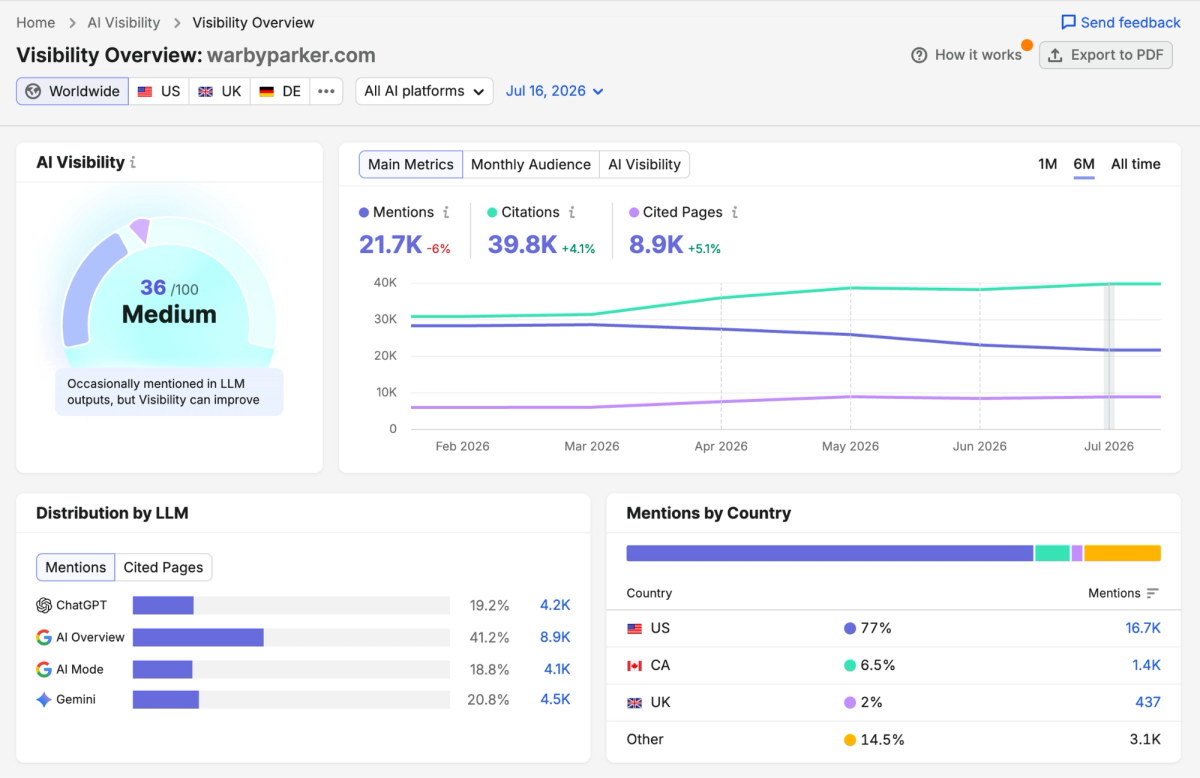
Standout strengths and analytics: Semrush explains that its reports use different datasets and update schedules. Broad Visibility Overview and Prompt Research help discover topics and competitors; custom Prompt Tracking follows the questions your team selects. Keep those views separate when interpreting trends.
Competitors and sources: Competitor research, brand sentiment and tracked-prompt source analysis support investigation of brand and citation gaps. Confirm which engines and locations are available in the specific report you intend to use, rather than treating toolkit-wide coverage as one uniform tracking configuration.
Reporting and access: CSV reporting is documented in the toolkit's guidance. Semrush also offers reporting products and enterprise custom integrations/API. Its general API or MCP offering should not be taken as proof that every AI report exposes every underlying answer through those routes.
Limitations: The Base offer is per domain with 25 custom prompts. Additional users, reporting products and enterprise requirements can change total cost. A broad research database complements your chosen prompts; it does not replace ongoing tracking of them.
Pricing and evaluation: The AI Visibility pricing page displays Base at $99/month per domain, billed annually, including 25 custom prompts and one Brand Performance domain. Enterprise is custom with a demo route. Semrush advertises a seven-day trial; confirm that your selected offer includes the AI reports you need.
6. Otterly.AI
Best for: Small teams starting daily monitoring, with an upgrade path for agency reporting.
Otterly.AI offers prompt-level brand and citation tracking with a low-volume entry plan. It is a practical option for starting a focused monitoring program, while its higher tiers add reporting and access features useful to agencies.
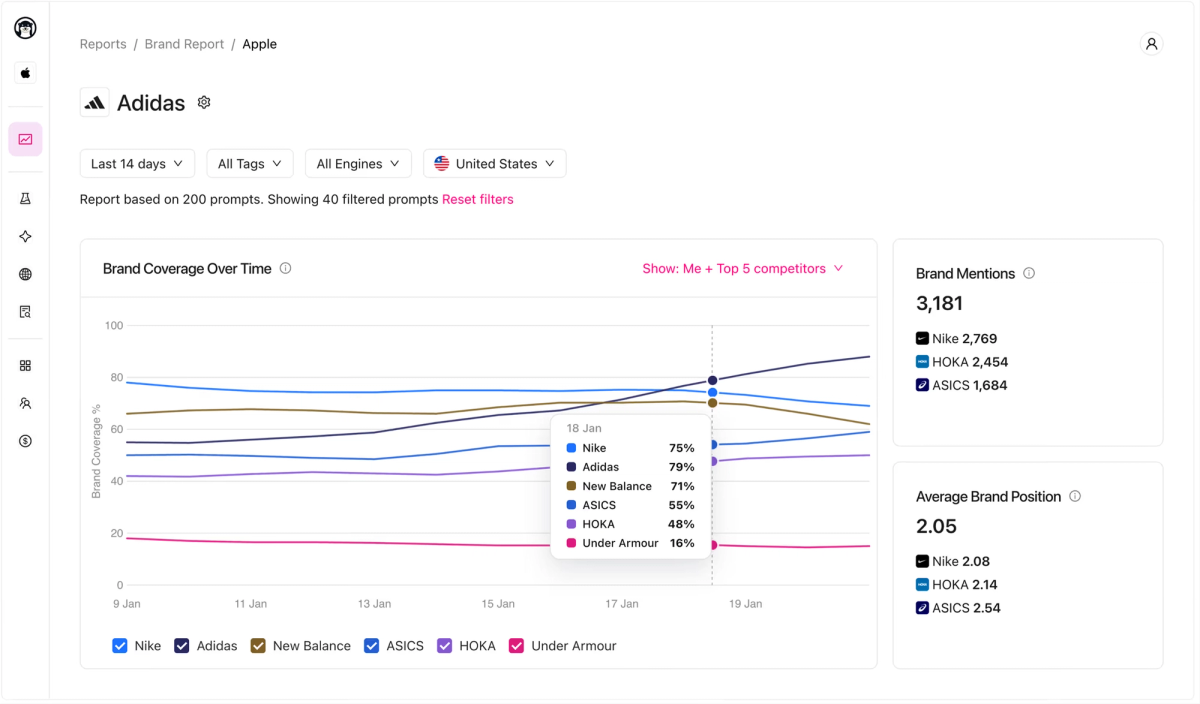
Standout strengths and analytics: The October product update documents Brand Coverage, Average Brand Position, Sentiment and Share of Voice, plus prompt performance trends. Prompt Responses and Citations views let users inspect the answers and links behind results. Recommendations and GEO audits add proposed next steps.
Competitors and sources: Brand reports compare competitors, while citation reports show changing cited URLs and domain sources. Raw response export is available in CSV/JSON. These capabilities go beyond the old article's description of basic mention tracking.
Reporting and access: Downloadable reports can include your logo. Standard and higher plans list Looker Studio, API and MCP, plus Agent Analytics. Agency-partner benefits include separate client workspaces and centralized billing.
Limitations: Lite has 15 prompts and one workspace. Google AI Mode, Gemini and Claude are paid engine add-ons. Connector, API/MCP usage and Agent Analytics allowances vary by tier, so price the intended configuration rather than only the entry subscription.
Pricing and evaluation: Monthly plans list Lite at $29, Standard at $189 for 100 prompts, and Premium at $489 for 400 prompts. ChatGPT, Google AI Overviews, Perplexity and Microsoft Copilot are listed as the four included engines. Enterprise is custom. A seven-day free trial is documented.
7. Scrunch
Best for: Brand and content teams investigating representation by topic, persona and region.
Scrunch combines AI Search monitoring, citation analysis, page audits and agent-traffic monitoring. Its audience and persona views make it relevant when marketers need to understand how the brand is presented to different kinds of buyer.
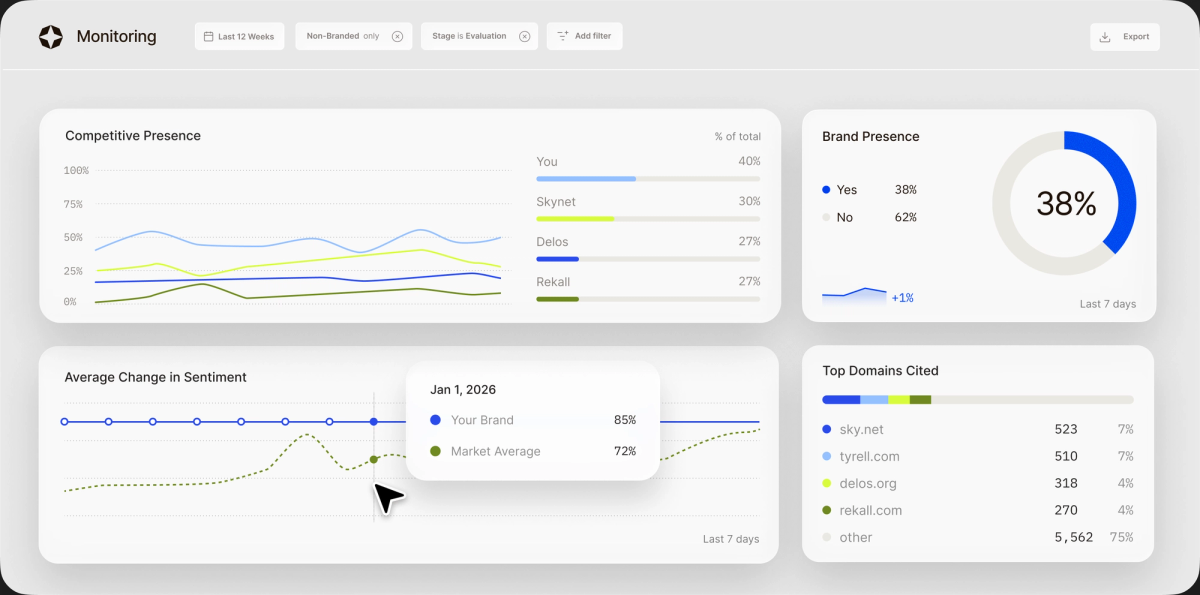
Standout strengths and analytics: Its monitoring guide describes brand presence, position, sentiment and competitive Share of Voice, with platform- and prompt-level drilldown. Topic, persona and region comparisons help teams locate a representation problem before choosing a content response.
Competitors and sources: Citation views show owned, competitor and third-party URLs. Prompt-level answers let teams inspect what was said about a brand. Page audits provide a separate view of site improvements to consider.
Reporting and access: Scrunch documents CSV exports and a performance-reporting dashboard. Enterprise includes its Data API. Its Query API provides aggregate metrics, while the Responses API exposes individual records. Choose the route that fits your external reporting.
Limitations: Seats, personas and audits are capped by plan. The Starter trial is limited to one brand and excludes Enterprise-only access. Its Agent Experience Platform, AXP, is a separate site-experience proposition to evaluate; this comparison does not claim it guarantees more citations or conversions.
Pricing and evaluation: Starter is $300 month-to-month or $250/month billed annually, with 350 custom prompts and three users. Growth is $500 monthly or $417/month annually; Enterprise is custom. Starter has a seven-day free trial without a credit card. Growth and Enterprise offer demos.
8. Writesonic
Best for: Content teams combining GEO analysis with content and SEO execution.
Writesonic combines AI visibility monitoring with content creation, audits and agent workflows. Its advantage for this shortlist is the connection between identifying a content gap and producing or revising material within the same broader platform.
To compare the content side of these platforms, including editors, writing tools and publishing options, read our guide to AI content optimization platforms.
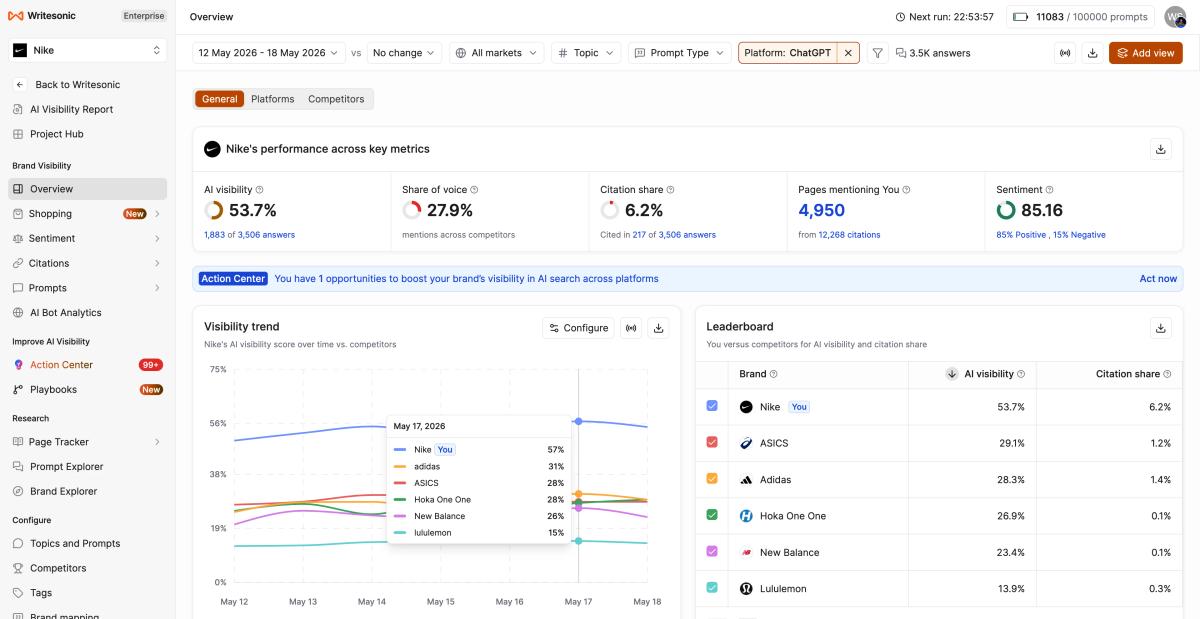
Standout strengths and analytics: The All Prompts and Answers view combines tracked questions with their answers, using market, topic, platform, date and brand-related filters. This helps teams investigate where competitors appear and identify gaps to work on.
Competitors and sources: Citation analysis covers cited pages and opportunities alongside competitor mentions. Sentiment and more extensive optimization features depend on the plan, so an entry-tier visibility view is not the full analytical product.
Reporting and access: Enterprise lists Looker Studio and other integrations. Writesonic documents a GEO MCP server for paid accounts, exposing performance, citation, prompt and sentiment reports, alongside REST API documentation. Confirm your required data and allowances for a custom reporting workflow.
Limitations: Self-service plans shown on the pricing page focus on ChatGPT, Gemini and Google AI Overviews. Eight-platform coverage and custom regions/languages are Enterprise features. Starter has one user and one project; sentiment begins on Growth, while full Action Center access is Enterprise.
Pricing and evaluation: The pricing page displays Starter at $79/month, Basic at $199 and Growth at $399, billed annually. Starter lists 50 prompts; Enterprise is custom. A free-trial route and demo are advertised. Confirm monthly billing and trial duration before subscribing.
9. Atomic AGI
Best for: Smaller teams combining SEO, AI Search analytics and automation in one workspace.
Atomic AGI combines SEO analytics, AI Search tracking, technical site analysis and automation. It is worth shortlisting when the team wants an integrated workspace and a low-cost paid entry rather than a dedicated enterprise GEO deployment.
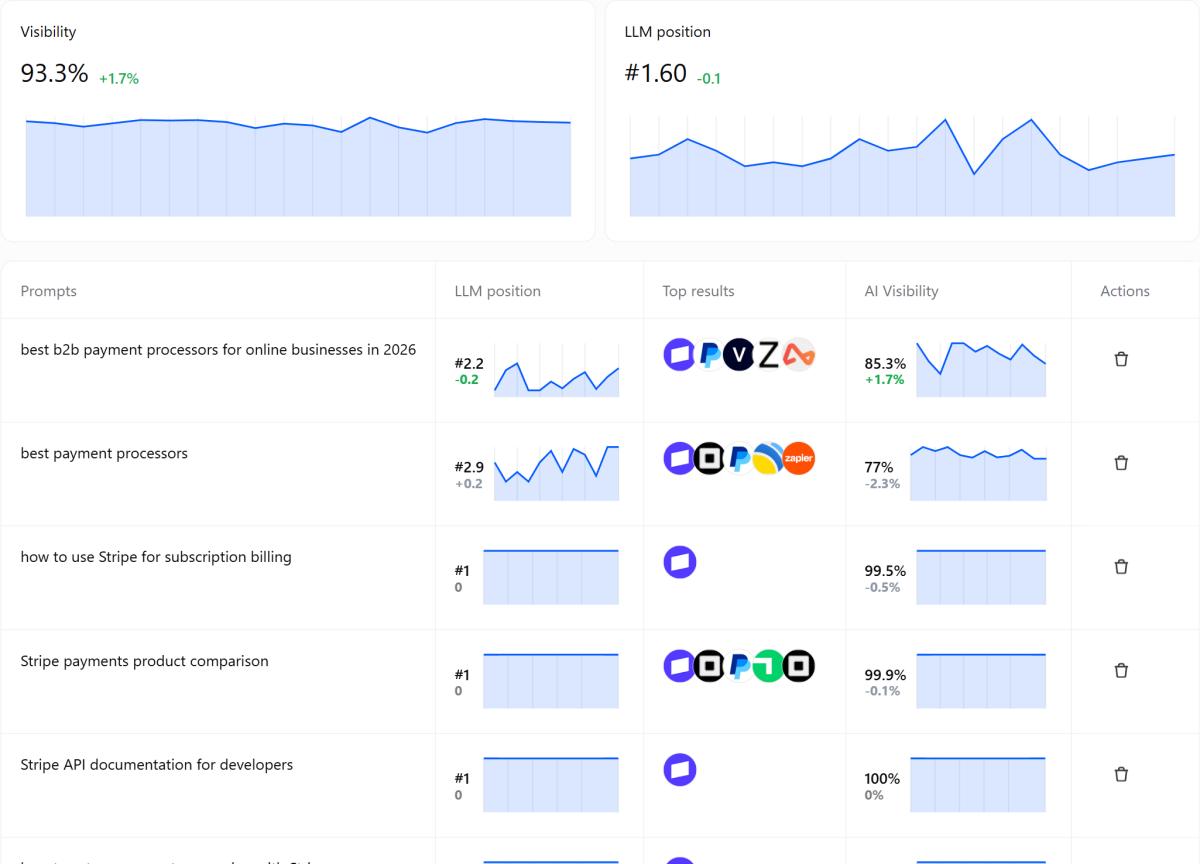
Standout strengths and analytics: Its SEO analytics product brings search views together. AI visibility, citations, position and sentiment can be reviewed alongside site coverage and technical opportunities.
Competitors and sources: Competitor tracking describes brand comparisons by prompt and engine, plus competitor-page coverage and citation-source categories. These views help identify missing information and relevant competing pages; they do not demonstrate why a model selected a brand.
Reporting and access: Paid plans list reports, report publishing and MCP. Team adds custom-domain reports and more workflow options. Test whether the report and data access cover the fields needed for your own dashboard.
Limitations: Pricing is per project, with model, competitor and user limits. The public pages are less explicit about enterprise brand/market rollups and raw-answer exports. Verify those requirements if this is a portfolio deployment.
Pricing and evaluation: Pricing lists a free plan with seven days of history, Starter at $40/month per project and Team at $100. Starter allows up to three models and five tracked competitors; Team lists up to six models and twenty competitors. Paid signup advertises a seven-day free trial, and a managed/demo route is available.
10. XFunnel, now part of HubSpot
Best for: HubSpot-oriented teams evaluating the current route from XFunnel's AEO approach.
XFunnel's public site describes visibility and sentiment monitoring, competitor ranking, response/citation investigation, and segmentation by region, persona and product. Its service-led proposition includes analyst support, playbooks and experimentation, useful for teams seeking help implementing a program.
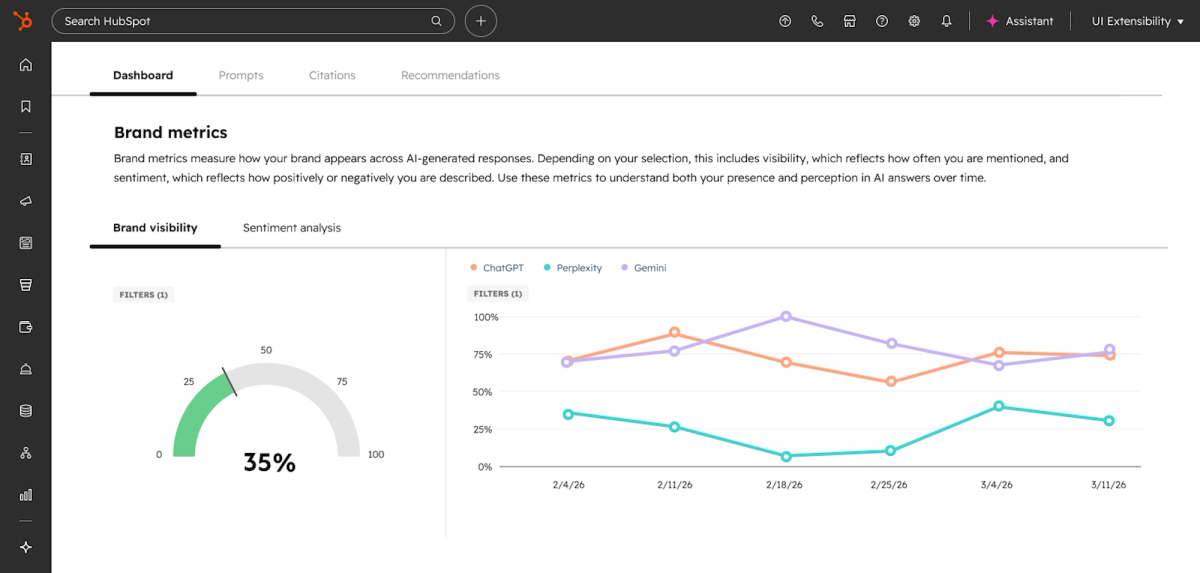
Current buying context: HubSpot now identifies XFunnel as an acquisition and offers HubSpot AEO. That changes the buying decision. Confirm whether the legacy XFunnel service is still available and which capabilities are included in the current HubSpot offer.
Analytics and source analysis: HubSpot AEO describes prompt tracking across ChatGPT, Perplexity and Gemini, competitor Share of Voice, citations and prioritized recommendations. It offers a current evaluation route, but those specifications should not be treated as the complete feature set of the old XFunnel product.
Reporting, limitations and evaluation: Verify exports, integrations, API/MCP access, multi-brand setup and any analyst support against the specific offer. Standalone XFunnel availability is unresolved, so treat it as a transition case rather than a directly comparable current standalone platform. The legacy site offers a strategy call without a public rate card. HubSpot AEO lists $50/month, or $45/month paid yearly, with 25 prompts and a free-trial route. These are HubSpot AEO terms, not a verified standalone XFunnel price.
What to look for in a GEO analytics platform
Use four questions to connect analytics capabilities to useful decisions:
The useful system tells you where visibility is strong or weak, which competitors are winning, which sources AI engines are citing, how your brand is being described, and what your team can change to improve those outcomes.
- Are you in the answer? Brand Visibility shows how often tracked answers mention the brand. Open the prompts where you appear or are missing to identify topics needing attention.
- Where do you appear or rank? Positioning and Share of Voice put your presence in competitor context. Being first in a list is not automatically a recommendation, and vendors can calculate these measures differently.
- How are you framed? Sentiment describes the language around the brand. Inspect the actual description too: a favorable answer can contain an incorrect product fact.
- What shapes the answer? Citation Rate shows how often responses link to your website. Source URLs, competing pages and relevant fan-outs help you investigate content and authority opportunities. Retrieved or accessed pages are not necessarily visibly cited sources.
In Superlines terminology, Brand Visibility, Citation Rate and Sentiment are core KPIs; positioning, Share of Voice and source views add context. Check current metric definitions when comparing vendor labels. Citation Rate and citation share are different measures. Our GEO metrics guide explains these distinctions further.
For complementary Microsoft-specific citation and grounding context, see our guide to Bing AI Performance.
For the dashboard itself, prioritize filters, answer access and useful reporting. Choose engines based on your audience and markets; there is no universal minimum. Confirm support for the specific engine-country-language combinations you need. A portfolio improvement can hide a decline in one market, so compare local segments as well as totals.
Source analysis becomes useful when it identifies a recurring page or information gap your team can act on. A frequently cited domain alone is not a guarantee that securing coverage there will improve visibility. See how to find sources and domains cited in AI Search for a practical workflow. For a broader adjacent shortlist, read our AI visibility tools comparison.
Enterprise vs agency considerations
Enterprise teams benefit from multi-brand and multi-market reporting, with filters for brand, business unit, market, language, topic and engine. Competitor analysis should work within those views. Central teams need portfolio reporting, while regional teams need to see which prompts, descriptions and sources require attention locally.
Agencies also need client separation, client-specific competitors and recurring reporting. Test whether you can switch between clients, prepare a branded report and share the relevant analysis without rebuilding it. Confirm permissions, client access, export formats and historical data in the proposed package.
For both groups, check whether exports fit the spreadsheets, presentations and dashboards already used by the team. API and MCP are useful when you want automated reporting or AI-assisted analysis with your own tools. Specify the data and workflow you need rather than choosing a platform solely because it advertises an integration.
How to evaluate shortlisted vendors through a trial or demo
For each tool on your shortlist, check whether it offers a free trial or tailored demo. Share your requirements in advance: brands, markets, languages, engines, competitors, topics, team access and the report you need to produce.
Ask about data collection, setup, relevant workflows, reporting, exports, integrations and best practices. Have the vendor demonstrate a few real tasks: compare competitors on a priority topic, inspect a brand description and its citations, filter by a market or engine, and prepare an export or report. Test API/MCP access if it is part of your intended workflow.
Use your own prompts where the evaluation permits it and review repeated answers rather than one favorable response. If a trial restricts prompts, markets or exports, request a demo of those requirements. Treat the trial as a buying exercise, not proof of financial ROI.
Get a quote for your actual configuration. Prompts, engines, markets, run frequency, brands, seats, history and access features can all affect cost. Ask how those allowances work, which add-ons are needed and how the package changes as you grow.
What GEO analytics can and cannot tell you about traffic and business outcomes
GEO analytics show observed visibility and representation in tracked answers. Website analytics can separately show identifiable referral visits and subsequent events. Customer discovery questions, CRM records and finance data add evidence about pipeline, sales and costs.
A citation does not establish a recommendation, click or conversion. A crawler request is a machine accessing a page, not a buyer visit. Referral tracking can miss a later visit through another channel, but that gap does not quantify hidden influence. A visibility improvement after an edit is an observation, not proof the edit caused it or generated incremental revenue.
Use our AI Search ROI guide for commercial evaluation and attribution uncertainty, and the Business Case guide for investment assumptions. Choose an analytics platform for the decisions and reporting it supports, while keeping financial attribution separate.
Choose a GEO analytics tool that fits your team
Shortlist tools around your actual job: ongoing competitive analysis, multi-market reporting, client management, content execution or a focused monitoring start. Compare the package that meets those needs, then use a trial or demo to see how the work gets done.
For enterprise marketing teams and agencies, book a Superlines demo with your brands, markets, priority prompts and reporting requirements. Explore competitor and source analysis, Action Center recommendations, and the UI, exports, API or MCP workflow your team wants to use.