From Crawl to Citation to Click: The Technical Foundation of AI Search Visibility
Learn how AI search crawlers discover and index your content, the difference between AI Training and AI Search bots, how to find and fix pages invisible to AI, connect bot activity to actual citations, and measure real business traffic from AI search.


Table of Contents
Before AI can mention your brand, it has to find your content. Before it can cite your page, it has to crawl and index it. Before you can measure business impact, you need to track the visitors who clicked through from an AI-generated answer.
This is the technical foundation layer of AI search optimization — the part that the other guides in this series assume is already working. If it is not, no amount of content optimization, competitive analysis, or brand narrative work will produce results, because AI engines cannot cite what they have not indexed.
This guide covers how AI crawlers discover your content, how to diagnose pages that are invisible to AI, how to connect bot activity data to actual citation counts, and how to measure real business traffic from AI search referrals. It is the infrastructure guide that makes everything else in the GEO curriculum possible.
How AI search crawlers work
AI engines do not search the web in real time for every question (with some exceptions like Perplexity). They rely on crawlers that visit your site beforehand, index your content, and make it available for the AI to reference later. Understanding which crawlers do what is the foundation of AI search technical readiness.
Two types of AI crawlers serve different purposes
| Type | What it does | Example bots | How it affects AI search |
|---|---|---|---|
| AI Training crawlers | Index content to train the AI model’s underlying knowledge | GPTBot (OpenAI), ClaudeBot (Anthropic), Google-Extended (Google) | Improves your chance of being mentioned in AI responses over time as the model “learns” about your brand |
| AI Search crawlers | Retrieve content in real time when a user asks a question | OAI-SearchBot (ChatGPT Search), PerplexityBot | Directly determines whether your page gets cited in the current response |
This distinction matters because the two types require different optimization:
AI Training crawlers reward comprehensive, authoritative content. The more depth and breadth of high-quality content about your brand and category on your site, the more training data the AI model absorbs, and the more likely it is to mention you in future responses. This is a long-term investment — changes to training data take weeks or months to appear in AI responses.
AI Search crawlers reward structured, direct-answer content that can be extracted in real time. When a user asks ChatGPT Search or Perplexity a question, the search crawler visits pages right now and extracts relevant content. This means well-structured pages can start earning citations within days of publication.
The major AI crawlers you should know
| Crawler | Company | Type | What to know |
|---|---|---|---|
| GPTBot | OpenAI | Training | Builds ChatGPT’s base knowledge. Blocking it means ChatGPT has less data about your brand |
| OAI-SearchBot | OpenAI | Search | Powers ChatGPT’s real-time search feature. High priority to allow |
| ChatGPT-Agent | OpenAI | Search | ChatGPT browsing mode agent. Same priority as OAI-SearchBot |
| ClaudeBot | Anthropic | Training | Builds Claude’s knowledge base. Allow unless you have specific reasons not to |
| PerplexityBot | Perplexity | Search | Real-time retrieval for Perplexity answers. Perplexity is the most citation-heavy AI platform |
| Google-Extended | Training | Trains Gemini. Separate from Googlebot, which handles regular search | |
| Meta-ExternalAgent | Meta | Training/Search | Meta’s AI crawler. Relevant to Meta AI visibility across Facebook, Instagram, and WhatsApp |
| Grok | xAI | Training/Search | xAI’s crawler for Grok. Growing in visibility as Grok expands its user base |
| DeepSeek | DeepSeek | Training | Crawler for DeepSeek’s AI models. Increasingly tracked by AI search platforms |
| Mistral | Mistral AI | Training | Crawler for Mistral’s AI models |
| Baiduspider | Baidu | Search engine | Traditional search, but relevant if you target Chinese markets |
| Bingbot | Microsoft | Search engine | Powers Copilot’s search. Copilot uses Bing’s index for real-time answers |
What happens when you block a crawler
Blocking AI crawlers in your robots.txt means that specific AI engine loses access to your content. This has direct consequences:
- Block GPTBot → ChatGPT has less training data about your brand → fewer mentions over time
- Block OAI-SearchBot → ChatGPT Search cannot retrieve your pages in real time → zero real-time citations from ChatGPT
- Block PerplexityBot → Perplexity cannot access your content → zero citations from Perplexity
Some organizations block AI crawlers for legitimate reasons (intellectual property, licensing, competitive concerns). But if your goal is AI search visibility, every blocked crawler is a platform where you are choosing to be invisible.
Step 1: Ensure your site is AI-crawlable
Goal: Verify that the technical prerequisites for AI crawler access are in place, so your content is discoverable.
The AI crawlability checklist
Work through this checklist for every page you want AI engines to find:
| Requirement | Why it matters | How to check |
|---|---|---|
| No robots.txt block on AI bots | Blocked bots cannot crawl your pages | Open your robots.txt file and search for GPTBot, OAI-SearchBot, ClaudeBot, PerplexityBot. Remove any Disallow rules for bots you want to access your content |
| Page is in your XML sitemap | Sitemaps tell crawlers which pages exist and when they were last updated | Verify in your sitemap generator that high-value pages are included |
| Page renders without JavaScript | Many AI crawlers do not execute JavaScript. If your content loads via a client-side framework (React SPA, Angular), the crawler may see an empty page | Test by disabling JavaScript in your browser and loading the page. If the content disappears, implement server-side rendering (SSR) or static generation (SSG) |
| Page loads in under 2 seconds | Crawlers have timeout limits. Slow pages may not be fully indexed | Test with Google PageSpeed Insights or Lighthouse |
| No login wall or authentication | Crawlers cannot enter passwords. Content behind a login is invisible | Ensure your public-facing content is accessible without authentication |
| No noindex meta tag | A <meta name="robots" content="noindex"> tag tells all crawlers to ignore the page | Check the page source for noindex tags on pages you want indexed |
| Canonical URL is correct | If the canonical points to a different URL, crawlers may ignore this version | Verify the <link rel="canonical"> tag points to the page itself, not a different URL |
| AI Search Readiness score | Superlines scores each crawled page for AI readiness. Low scores indicate structural or content issues that reduce citation likelihood | In Superlines, go to Website → Site Health (or navigate to /site-crawl). Each page shows a “Technical SEO” score and an “AI Search Readiness” percentage — use these as your baseline before optimizing |
Checking your robots.txt for AI bots
Your robots.txt file (accessible at yoursite.com/robots.txt) controls which bots can access which parts of your site. Here is what an AI-friendly robots.txt looks like:
User-agent: GPTBot
Allow: /

User-agent: OAI-SearchBot
Allow: /

User-agent: ChatGPT-User
Allow: /

User-agent: ClaudeBot
Allow: /

User-agent: PerplexityBot
Allow: /

User-agent: Google-Extended
Allow: /
If your robots.txt contains Disallow: / for any of these bots, you are blocking that AI engine from crawling your content entirely. If it contains specific path blocks like Disallow: /articles/, you are blocking AI access to that entire section.
A common mistake: some robots.txt templates include a blanket User-agent: * rule with broad Disallow entries. This can accidentally block AI crawlers that are not explicitly listed in your Allow rules. Review your file carefully.
Step 2: Find your “dark pages” — content invisible to AI
Goal: Identify high-value pages that humans visit but AI crawlers are not indexing.
What dark pages are
A “dark page” is a page with meaningful human traffic but near-zero AI bot visits. These pages are effectively invisible to AI — they might be your best content, but if AI crawlers are not reaching them, the AI cannot cite them.
How to find dark pages
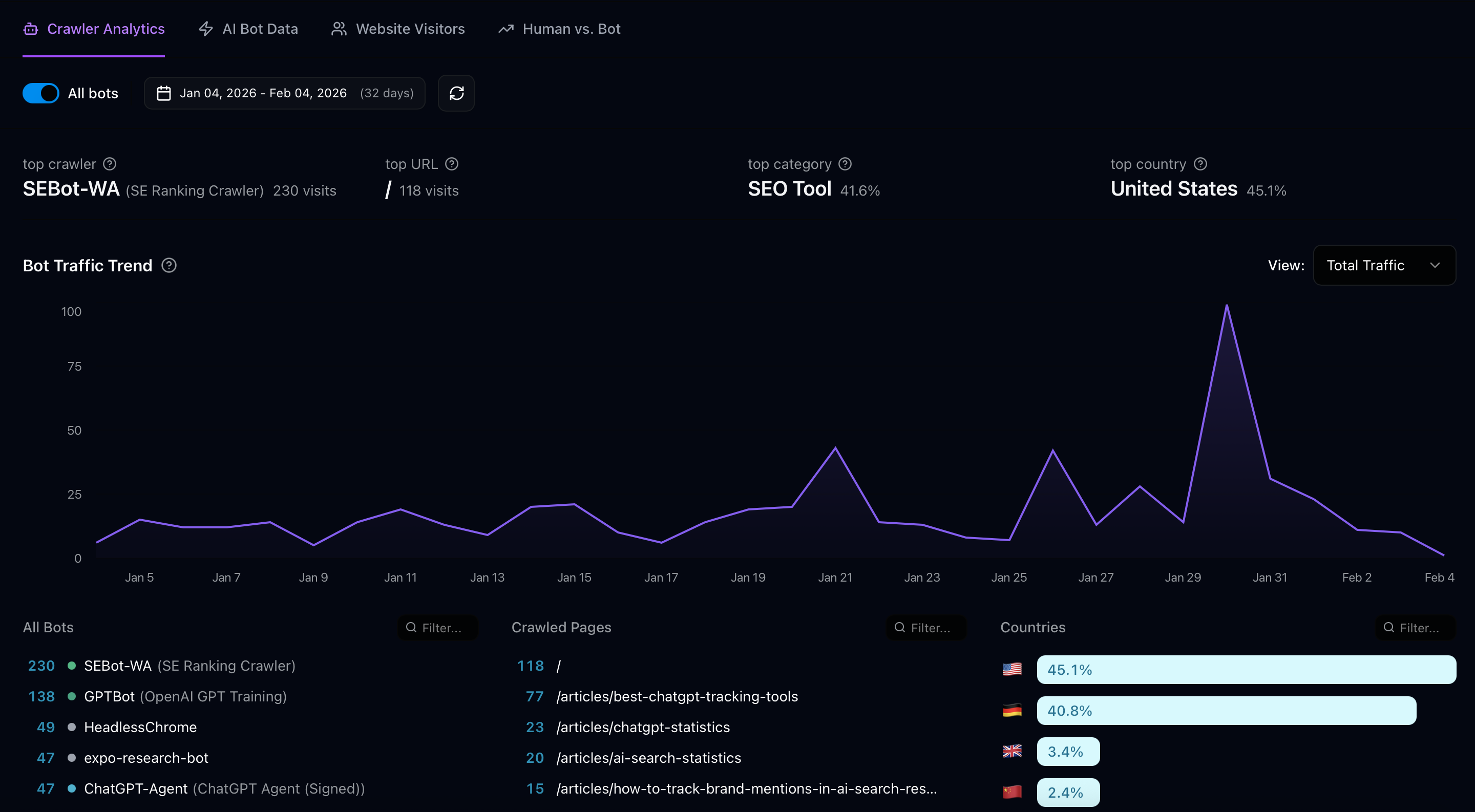
Cross-reference your human traffic data against your bot crawl data. In Superlines, the Crawler Analytics tab (sidebar → Crawler Analytics, page header: “Bot Traffic”) shows which pages AI bots are visiting. The Human vs. Bot tab gives you a side-by-side breakdown of total visits, bot visit percentage, human visit percentage, and top bots — use this tab to identify pages where human traffic is high but bot share is low.
Note: The data below is illustrative, based on a specific 29-day snapshot from Superlines’ own account. The figures in your account and any updated snapshot of Superlines’ data will differ.
| Page | Human pageviews | AI bot visits | Status |
|---|---|---|---|
| / (homepage) | 2,481 | 91 | Proportional — bots crawl this heavily |
| /articles/best-chatgpt-tracking-tools | 500 | 85 | Good — bots are finding this |
| /features | 320 | Not in top crawled | Dark page — invisible to AI |
| /about-us | 160 | 3 (AI only) | Low crawl — check structure |
Pages not appearing in the Crawler Analytics data at all are your dark pages — they get human traffic but AI engines are not reaching them. In this example, /features gets meaningful human traffic but does not appear in the AI crawl data. This means when a user asks “What features does [your product] have?”, the AI cannot cite this page because it has not crawled it.
Filtering for AI bots: The Crawler Analytics tab shows all bots by default, including SEO crawlers (like SE Ranking, Ahrefs) and other non-AI bots that make up a large share of bot traffic. Use the “All bots” toggle in the tab to filter the view and focus specifically on AI crawlers. This gives you a cleaner picture of which pages AI engines are actually visiting.
Common causes of dark pages
| Cause | How to diagnose | Fix |
|---|---|---|
| JavaScript rendering | Disable JS in browser — does content disappear? | Implement SSR/SSG |
| Missing from sitemap | Check your sitemap for the page URL | Add the page to your sitemap |
| robots.txt block | Check robots.txt for path-level disallow rules | Remove the disallow rule |
| Orphan page (no internal links) | Check how many internal links point to this page | Add internal links from other pages |
| Slow page load | Test with PageSpeed Insights | Optimize images, reduce scripts, improve server response |
| Login required | Can you access the page in an incognito window? | Move content in front of the login wall |
Prioritizing which dark pages to fix
Not every dark page matters equally. Prioritize based on strategic value:
| Priority | Dark page type | Why it matters for AI search |
|---|---|---|
| Highest | Product/pricing pages | AI engines are asked about pricing and features constantly. Missing these means missing buying-intent queries |
| High | Comparison articles targeting tracked prompts | These are your primary citation assets. If AI cannot crawl them, your entire content strategy is undermined |
| Medium | About/team/company pages | AI uses these for brand description and authority signals |
| Lower | Blog posts on tangential topics | Only fix if the post targets a high-volume tracked prompt |
Step 3: Understand the crawl-to-citation pipeline
Goal: Connect the dots between which bots visit your pages and whether those visits actually produce AI citations.
The pipeline
Bot crawling your page is step one, not the finish line. The full pipeline has four stages:
Stage 1          Stage 2          Stage 3          Stage 4
Bot crawls   →   AI indexes   →   AI cites     →   Human clicks
your page        your content     your page         through to
                                  in a response     your site

Measured by:     Inferred from    Measured by:      Measured by:
Bot visit data   citation data    Citation counts   Referral traffic
in Superlines    in Superlines    per platform      from AI domains
A page can stall at any stage:
| Stall point | Symptom | Diagnosis |
|---|---|---|
| Bot crawls but AI doesn’t index | Bot visits show in crawl data, but zero citations | Content is not structured well enough for AI to extract useful information. Audit the page for direct answers, headings, and structure |
| AI indexes but doesn’t cite | Citations exist on other platforms but not on the one whose bot is crawling | The AI has the content but does not consider it authoritative enough to cite. Build backlinks, add external data, strengthen the page |
| AI cites but humans don’t click | Citations show in Superlines but no referral traffic from AI domains | The AI is citing you but the description may not be compelling enough for users to click through. Improve your meta description and the first paragraph of your content |
Reading bot visit data alongside citation data
Correlating bot visits with citations requires checking two separate tabs in Superlines:
- Bot visit counts are in the Crawler Analytics tab — this shows which pages and which bots are crawling your site.
- Citation counts are in the AI Bot Data tab — this shows citation metric cards per platform (ChatGPT Citations, Perplexity Bot, Claude Bot, Copilot).
There is no single view that automatically cross-references these two data sets. You need to compare them manually: note which bots are visiting frequently in Crawler Analytics, then check whether citations are growing or declining for the corresponding platform in AI Bot Data.
Note on the “Citations by time” chart: The AI Bot Data tab currently shows “Citation trend data coming soon” for the chart. Trend line data is in development and not yet available as a functional chart.
Here is what the manual comparison looks like using Superlines’ own data as an illustrative example (29-day period; figures will differ in your account and will change over time):
| Platform | Bot visits (29 days) | Citations (29 days) | Trend | What the data suggests |
|---|---|---|---|---|
| ChatGPT (GPTBot + OAI-SearchBot + ChatGPT-Agent) | 257 | 11,454 | +12% | Strong citation return per crawl — pipeline is healthy |
| Perplexity (PerplexityBot) | Not in top 10 bots | 5,950 | +5% | Perplexity may be citing cached content or training data |
| Claude (ClaudeBot) | 2 visits | 4,391 | -3% | Minimal current crawling — citations may decay |
| Copilot (via Bingbot) | Not tracked separately | 3,504 | +8% | Copilot draws from Bing’s index, not a dedicated bot |
The Claude data tells a specific story: only 2 ClaudeBot visits in 29 days, and citations are declining (-3%). This is the crawl-to-citation pipeline showing a problem — Claude is not refreshing its knowledge of your content, which means its citations will gradually stale out. The fix: ensure ClaudeBot is not blocked, verify your sitemap is accessible, and consider publishing new content on topics where Claude currently cites you.
The ChatGPT data tells the opposite story: 257 bot visits across three OpenAI crawlers, 11,454 citations, and a +12% growth trend. The crawl-to-citation pipeline is healthy and growing.
Step 4: Measure real business traffic from AI search
Goal: Track the actual humans who click through from AI-generated responses to your website — the ultimate proof that AI search visibility produces business value.
AI referral traffic: the metric leadership cares about
When an AI engine cites your page in a response, some users click through to read the source. That click-through shows up in your analytics as referral traffic from the AI platform’s domain.
In Superlines’ own Website Visitors data, AI referral traffic is already visible. The table below is from a 29-day snapshot — figures in your account and in any future Superlines snapshot will differ:
| Referral source | Visits (29 days) | What it means |
|---|---|---|
| chatgpt.com | 183 | Users clicked through from ChatGPT responses citing Superlines content |
| perplexity.ai | 73 | Users clicked through from Perplexity responses |
| www.bing.com | 59 | Users clicked through from Bing/Copilot responses |
| claude.ai | 56 | Users clicked through from Claude responses |
| gemini.google.com | 62 | Users clicked through from Gemini responses |
These visits are direct evidence of AI search working as a traffic channel. Each one represents a user who asked an AI engine a question, received a response that cited Superlines, and clicked through to learn more. This is high-intent traffic — the user is actively researching.
Setting up AI referral tracking
Option 1: Connect Google Analytics natively in Superlines
Superlines has a built-in Google Analytics 4 integration that automatically surfaces LLM-referred traffic inside the platform. This is the fastest way to connect AI search visibility to real business traffic without manual GA4 filter setup.
There are two ways to reach the setup:
- Shortcut: In the sidebar, go to Website → GA4 AI Traffic (or navigate to
/llm-traffic). This takes you directly to the Google Analytics configuration flow. - Via Integrations page: In the sidebar, go to Integrations. Scroll to “Add New Integration”, find Google Analytics, and click Connect.
Then:
- Sign in with the Google account that has access to your GA4 property.
- Select the GA4 property and click Authorize.
Once connected, Superlines surfaces AI-referred traffic data alongside your visibility and citation data, allowing you to compare periods, identify which AI platforms produce the most valuable traffic, and correlate citation changes with actual visit changes.
Option 2: Manual setup in Google Analytics 4
If you prefer to work directly in GA4 without the Superlines integration:
- Navigate to Reports → Acquisition → Traffic Acquisition
- Filter by Session source containing:
chatgpt.com,claude.ai,gemini.google.com,perplexity.ai,copilot.microsoft.com - Create a custom channel group called “AI Search” that includes all AI referral domains
In Superlines: The Website Visitors tab already shows referral sources ranked by visit count. Check this tab monthly to track AI referral growth.
The referral domains to track
| AI platform | Referral domain(s) | Notes |
|---|---|---|
| ChatGPT | chatgpt.com | Includes both web and mobile app clicks |
| Claude | claude.ai | Anthropic’s AI assistant |
| Gemini | gemini.google.com | Google’s AI assistant |
| Perplexity | perplexity.ai | Often the highest click-through rate due to its source-citation UI |
| Copilot | www.bing.com | Copilot referrals appear as www.bing.com in analytics, not as a separate copilot.microsoft.com entry |
| Google AI Overviews | google.com | Difficult to separate from regular Google search — use landing page analysis |
Connecting referral traffic to business outcomes
AI referral traffic becomes a business metric when you track what those visitors do after clicking through:
| Measurement | How to track | What it tells you |
|---|---|---|
| Pages per session (AI referrals) | GA4 engagement metrics filtered by AI source | Are AI visitors exploring your site or bouncing? |
| Conversion rate (AI referrals) | GA4 conversions filtered by AI source | Are AI visitors signing up, requesting demos, or purchasing? |
| Time on site (AI referrals) | GA4 engagement time filtered by AI source | Are AI visitors deeply engaged or quickly scanning? |
| Landing pages (AI referrals) | GA4 landing page report filtered by AI source | Which of your pages are converting AI traffic? |
If your AI referral conversion rate is higher than your organic search conversion rate, that is a strong signal to invest more in AI search optimization — and a compelling data point for stakeholder reporting.
Step 5: Optimize for AI Training and AI Search separately
Goal: Understand that content optimized for long-term AI training is different from content optimized for real-time AI search retrieval, and adjust your strategy for both.
Content that trains AI models well
AI Training crawlers (GPTBot, ClaudeBot, Google-Extended) are building the model’s general knowledge. The content they index becomes part of how the AI understands your brand and category. This means:
| Content characteristic | Why it matters for training |
|---|---|
| Comprehensive category coverage | The more topics you cover authoritatively, the more the AI “knows” about your brand |
| Consistent terminology | Using the same category terms across pages strengthens the association between your brand and that category |
| Factual, data-rich content | Training data with statistics and verifiable facts is weighted higher than opinion |
| Updated regularly | Models retrain periodically. Stale content gets superseded by newer competitor content |
Optimization for training: Publish broadly. Cover your category from multiple angles. Use consistent brand and category language. Update existing content with fresh data quarterly.
Content that earns real-time citations
AI Search crawlers (OAI-SearchBot, PerplexityBot) retrieve content in real time to answer specific questions. They need content they can extract an answer from quickly:
| Content characteristic | Why it matters for real-time search |
|---|---|
| Direct answer in the first paragraph | The crawler needs to find a clear, citable answer without reading the entire page |
| Headings that match search queries | AI search queries become web searches. Headings that match those queries get prioritized |
| Structured data (tables, lists, FAQ) | Structured content is easier for crawlers to parse and extract |
| Recent publish/update date | Real-time search prioritizes fresh content |
Optimization for search: Structure every page around a primary question. Answer it in the first two sentences. Use headings that match the queries users ask. Include tables and lists. Keep the publish date current.
The dual-track content approach
The best AI search strategy serves both purposes simultaneously. Here is how to structure a page that works for both training and search:
# [Question that matches a search query]

[Direct 2-3 sentence answer — optimized for real-time search extraction]

## [Sub-question as H2]

[Detailed explanation with data — optimized for training depth]

According to [source], [statistic that adds authority]...

## [Another sub-question as H2]

[Comparison table — optimized for both training and search]

| Option | Feature A | Feature B | Price |
|--------|-----------|-----------|-------|
| ...    | ...       | ...       | ...   |

## Frequently Asked Questions

[FAQ section — optimized for both real-time extraction and training]
The top of the page serves search crawlers (direct answer, query-matching heading). The body serves training crawlers (depth, data, comprehensive coverage). Both types of crawler find what they need.
Step 6: Use bot traffic trends as a content feedback signal
Goal: Treat changes in bot crawl patterns as signals about what is working and what needs attention.
What bot traffic spikes tell you
A spike in AI bot traffic usually means one of three things:
-
You published new content and AI crawlers found it — This is the desired outcome. If a spike follows a publication by 3-7 days, your sitemap and internal linking are working correctly.
-
An AI platform updated its crawler frequency for your domain — This can happen when your domain’s authority or relevance increases. More citations → more crawl interest → more citations. This is the flywheel effect.
-
A new crawler started visiting your site — Check the All Bots list for any new entries. New AI crawlers are periodically launched as AI companies expand their capabilities.
What bot traffic drops tell you
A decline in AI bot visits is an early warning signal:
| Pattern | Possible cause | Action |
|---|---|---|
| One specific bot’s visits dropped | That platform may have deprioritized your domain, or your robots.txt changed | Check robots.txt, verify sitemap accessibility, publish fresh content |
| All bot visits dropped | Site-wide technical issue — slow load times, server errors, or a recent migration that broke URLs | Run a technical audit immediately |
| AI search bots dropped but training bots are stable | Real-time search relevance declined, possibly because a competitor published better content for your target queries | Check competitive citation data for recent shifts |
Correlating publication activity with crawl response
The most actionable feedback loop in bot traffic data is the publication → crawl response time:
Day 0: Publish new article
Day 1-3: Check if article appears in Crawled Pages list
Day 7-14: Check if AI bot visits to the article are growing
Day 14-28: Check if citations for the article's target prompt increased
Day 28+: Check if AI referral traffic from the article is measurable
If your new content is not appearing in the Crawled Pages list within 3 days of publication, there is a discoverability problem. Common fixes:
- Submit the URL to Google Search Console (which helps Googlebot and Google-Extended)
- Submit the URL to Bing Webmaster Tools (which helps Bingbot and Copilot)
- Add internal links to the new page from your most-crawled existing pages
- Share the URL on social platforms — some AI crawlers follow social links
Superlines integrations that help with discoverability: The Superlines Integrations page (sidebar → Integrations) includes a native Search Console connector (“Import real user prompts and discover relevant queries”), which lets you bring GSC data directly into Superlines for cross-referencing crawl and query data. The Integrations page also includes connectors for Looker Studio (useful for building custom dashboards that connect AI referral traffic to business outcomes) and Sanity CMS (AI-powered content creation). These are worth exploring alongside your crawler tracking setup.
Step 7: Build the crawl-to-citation flywheel
Goal: Create a self-reinforcing cycle where better content produces more crawl activity, which produces more citations, which produces more referral traffic, which reveals what to create next.
The flywheel stages
  Publish structured,     AI crawlers discover
  AI-ready content    ──► and index the content
        ▲                        │
        │                        ▼
  Use referral data       AI engines cite your
  to identify which  ◄── pages in responses
  content to expand        │
        ▲                  ▼
        │            Users click through
        │            from AI responses
        │                  │
        └──────────────────┘
       Referral traffic reveals
       which content converts
Making the flywheel turn faster
Each stage of the flywheel can be accelerated:
| Stage | Default speed | How to accelerate |
|---|---|---|
| Publish → Crawl | 3-7 days | Submit to Search Console and Bing Webmaster Tools immediately. Link from your most-crawled pages |
| Crawl → Citation | 7-21 days | Structure content with direct answers and FAQ sections that search crawlers can extract instantly |
| Citation → Click | Immediate (once cited) | Write compelling meta descriptions and first paragraphs that make users want to read the source |
| Click → Insight | 14-30 days (data accumulation) | Monitor AI referral traffic weekly. Cross-reference with citation data |
| Insight → Publish | Depends on content velocity | Use the Agent (sidebar → Analytics → Agent) to ask questions about your data, run competitive audits, and identify content gaps — then use the AEO content pipeline to automate draft creation |
The monthly review that keeps the flywheel healthy
Once a month, run this diagnostic across all four stages:
Crawl health: Are AI bot visits stable or growing? Any new dark pages? Any crawlers that stopped visiting?
Citation health: Are citations per platform growing? Any platform-specific declines? New URLs entering the citation list?
Referral health: Is AI referral traffic growing? Which AI platforms produce the most click-throughs? Which landing pages convert AI traffic best?
Content pipeline: Based on citation and referral data, what should you publish next? Which existing pages should you update?
This monthly review takes 30-60 minutes and produces a concrete list of actions for the next month. Over quarters, it compounds — each round of improvements feeds better data into the next round.
Bringing it together: The technical foundation
AI search visibility is built on three layers, and the technical foundation is the bottom one:
| Layer | What it covers | Guide |
|---|---|---|
| Technical foundation | AI crawlability, bot access, indexing, referral measurement | This guide |
| Content optimization | Page structure, schema markup, content templates, audit tools | Audit and Optimize guide |
| Strategic positioning | Competitive displacement, off-site citations, brand narrative | Citation Intelligence and Brand Narrative guides |
Without the technical foundation, the other two layers cannot produce results. A perfectly structured comparison article that GPTBot cannot crawl will never earn a ChatGPT citation. A brilliant brand narrative that ClaudeBot is blocked from accessing will never appear in Claude responses.
Start here: check your robots.txt for AI bot blocks, find your dark pages, verify that your most important content is being crawled, and set up AI referral tracking. These are the prerequisites that make everything else in AI search optimization possible.
What to read next
- Practical Generative Engine Optimization — Assess your brand position and identify visibility opportunities
- How to Audit, Optimize, and Measure Content — Page-level content optimization, schema markup, and measurement
- Competitive Citation Intelligence and Off-Site Strategy — Win citations through third-party content, reviews, and community
- Control Your Brand Narrative in AI Search — Move from being mentioned to being recommended
- Build an Agentic AEO Content Pipeline — Automate the full intelligence and content creation process