How to Audit, Optimize, and Measure Your Content for AI Search Citability
A hands-on playbook for auditing individual pages for AI readiness, optimizing them with structured data, building a prompt tracking portfolio, and measuring whether your changes actually improved AI search visibility.


Table of Contents
You have read your AI search dashboard. You know your brand visibility is low on certain platforms and your competitors are winning citations on key prompts. Now what?
This guide covers the execution side of Generative Engine Optimization — the part that comes after reading the data. You will learn how to audit a specific page to understand why AI engines are not citing it, fix the issues using content structure and schema markup, set up the right prompts to track your progress, and measure whether your changes actually moved the needle.
This is the companion to Practical Generative Engine Optimization, which teaches how to read AI search data and identify opportunities. This guide assumes you have found those opportunities and are ready to act on them.
Before you begin
If you are starting from zero, do not jump straight to Steps 2-7. First make sure you have:
- At least one brand and domain set up in Superlines
- An initial prompt set to track.
30-50prompts is ideal, but10-15is enough to begin - Enough prompt runs completed for citation and competitive data to populate
If your dashboard is still mostly empty, use this order:
- Complete Step 1 first
- Wait for prompt-response data to populate
- Use Step 2 to shortlist pages
- Use Steps 3-7 to audit, optimize, and measure
How to read this guide: Every step includes a Where to find this in Superlines note so you know exactly where to click in the dashboard. Notes marked Works outside Superlines too call out advice you can apply in any CMS or website stack, not just inside Superlines.
The gap between knowing and doing
Most brands stall at the same point in their GEO process. They can see that their Brand Visibility is 1.7%, that competitors dominate key prompts, and that their citation rate is falling. But they don’t know how to go from “this page isn’t being cited” to “this page is now optimized for AI citations.”
The problem is that AI citability is not a single thing to fix. It is a combination of content structure, technical markup, topic authority, and freshness — and the weight of each factor varies by AI platform. Superlines provides tools that diagnose these factors at the individual page level, which is where this guide begins.
Step 1: Build your prompt tracking portfolio
Goal: Set up the right set of tracked prompts so you can measure what matters — not just track everything.
Before you can optimize, you need to define what conversations you want your brand to appear in. In Superlines, these are called tracked prompts — the questions you send into AI engines to monitor whether your brand gets mentioned or cited.
Where to find this in Superlines: Start in
Prompts -> Prompt Importif you already have SEO, GSC, CSV, or keyword data to bring in. UsePrompts -> Tracked Promptsto add individual prompts, label them, and review coverage. UsePrompts -> Prompt Radarto discover new prompts you are not yet tracking. UsePrompts -> Prompt Managementfor bulk cleanup and status changes once your list grows.
How to choose prompts strategically
Think of prompts as falling into four categories:
| Category | Example prompt | Why track it |
|---|---|---|
| Category-defining | ”What are the best AI search visibility tools?” | High volume, shows your market share |
| Competitor alternative | ”alternatives to Semrush for AI search tracking” | Buyers actively evaluating, highest conversion intent |
| Problem-solving | ”how to track brand mentions in ChatGPT” | Users who need your product but don’t know it exists |
| Feature-specific | ”tools that track AI citation rate by platform” | Users with specific requirements your product meets |
A balanced portfolio should include prompts from all four categories. Most brands over-index on category-defining prompts and under-index on competitor alternative and problem-solving prompts — which are often the highest-converting.
Organizing prompts with labels
As your portfolio grows past 50 prompts, organization becomes critical. Use labels to group prompts so you can filter your analytics by strategic intent:
| Label | What it covers | How to use the data |
|---|---|---|
category | Broad category queries | Track overall market share |
competitor | ”[Competitor] alternatives” queries | Measure displacement progress |
problem | Problem/question queries | Find content gaps |
feature | Feature-specific queries | Validate product messaging |
brand | Branded queries about you | Monitor brand narrative |
When you review your analytics, filtering by label reveals different strategic stories. Your competitor prompts might show 4% visibility (room to grow with comparison content), while your problem prompts show 0% (you need how-to guides that answer these questions).
How many prompts to track
Start with 30-50 prompts across the four categories. Each prompt costs tracking capacity, and spreading too thin dilutes your analysis. Focus on prompts where either (a) you suspect there is existing demand, or (b) competitors are clearly winning and you want to close the gap. You can always add more as your content library grows.
Import from your existing SEO keyword data as a starting point — AI search and organic search share significant query overlap, particularly for informational and commercial investigation queries. In practice, the easiest workflow for most teams is: start with Prompt Import, organize the imported prompts in Tracked Prompts, then use Prompt Radar to expand into adjacent opportunities you missed manually. If you want a deeper walkthrough of prompt sourcing, see Automated Prompt Discovery Strategy.
Step 2: Identify which pages to optimize first
Goal: Use your citation and competitive data to find the specific pages that need work — and the specific pages that competitors are winning with.
Where to find this in Superlines: Go to
Analytics -> Citationsto see which of your domains and URLs AI engines cite most often. TheTop Domains & URLswidget on theAnalytics -> Visibilitypage is a quick shortcut, butCitationsis the main working view for this step.If you’re starting from zero: If this report is still empty, you likely need more tracked prompts or more time for runs to complete. In the meantime, shortlist pages by matching your highest-priority prompts to existing pages on your site, then move to Step 3 and audit those pages proactively.
Not every page on your site is equally important for AI search. The pages that matter most are:
- Pages already being cited — They are working, but can be strengthened
- Pages that match high-volume prompts where you have 0% visibility — They exist but aren’t good enough for AI to cite
- Pages that don’t exist yet — Content gaps where you have no asset at all
Finding your currently cited pages
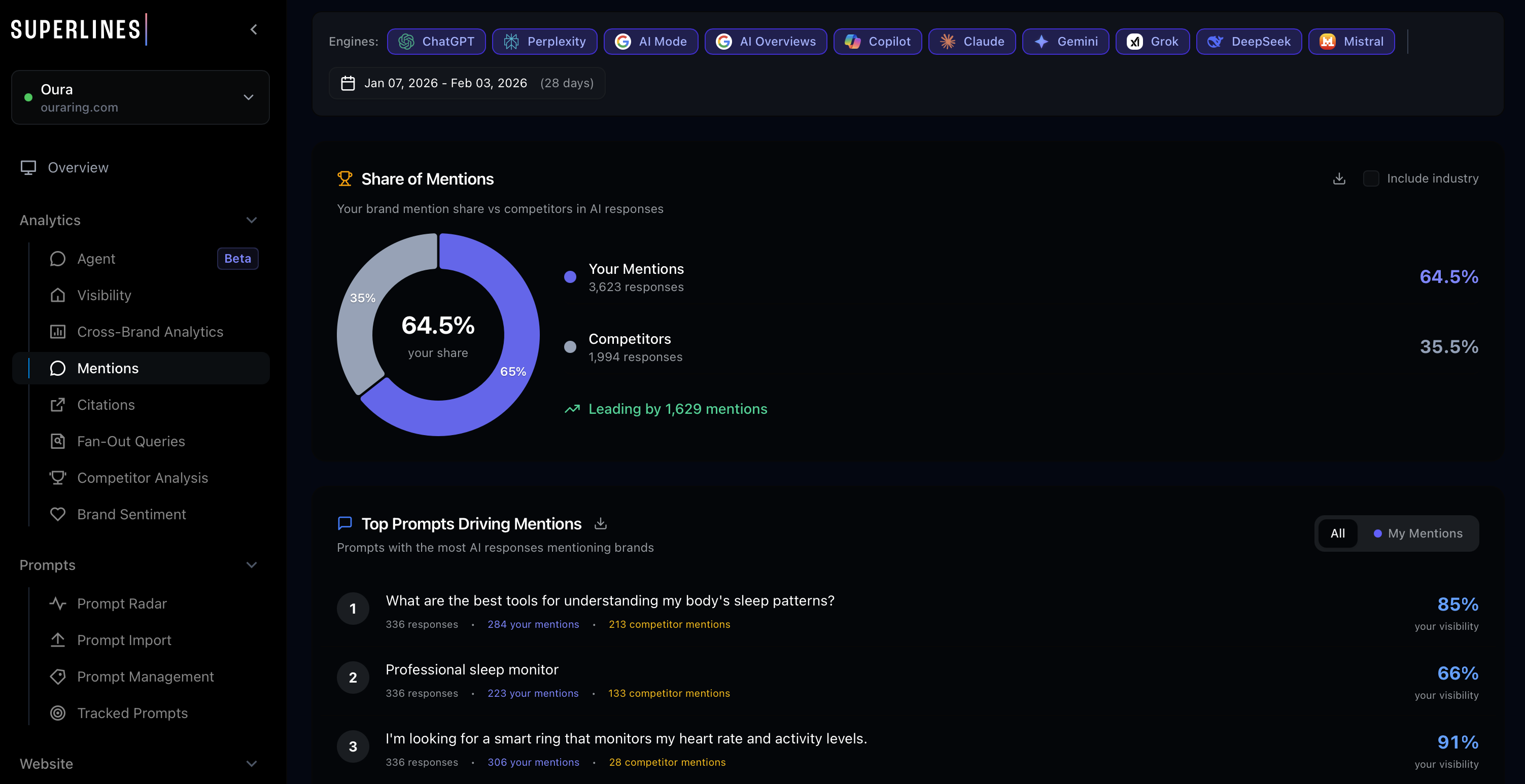
Your Superlines citation data shows which of your URLs are being cited in AI responses. Look at this list as your “AI search portfolio” — these are the content assets that AI engines already trust.
For Superlines, only 21 URLs are drawing citations compared to 196 competitor URLs. That URL count gap — 21 versus 196 — is itself a strategic signal. AI engines spread citations across many pages. Having only 21 cited pages means most of your content library is invisible to AI. Competitors with 196 cited URLs have built a much larger “AI-ready” content surface.
Prioritizing what to work on
| Page status | Action | Priority |
|---|---|---|
| Already cited at position #1-3 | Protect and strengthen — add fresh data, build backlinks | Highest |
| Already cited at position #4+ | Optimize — improve structure, add external stats, freshen | High |
| Exists but not cited | Audit and fix — the page has a structural or quality problem | Medium |
| Doesn’t exist | Create — build a new page matching the gap | Lower (higher effort) |
The reason “protect what works” is the highest priority: losing an existing citation position is harder to recover than gaining a new one. AI engines build trust incrementally, and a page that drops out of citation rotation often needs significantly more work to re-enter.
Step 3: Audit a page for AI search readiness
Goal: Diagnose exactly why a specific page is or isn’t being cited by AI engines.
Where to find this in Superlines: Go to
Tools -> AI Search Checkerto run a page-level AI citability diagnostic. Note thatToolsalso contains a separate Site Analyzer tool (/seo/website-audit) for general SEO health — these are two distinct tools serving different purposes.If you’re starting from zero: You do not need existing citation data to run an audit. Start with the pages that best match your highest-priority prompts, even if they have never been cited yet.
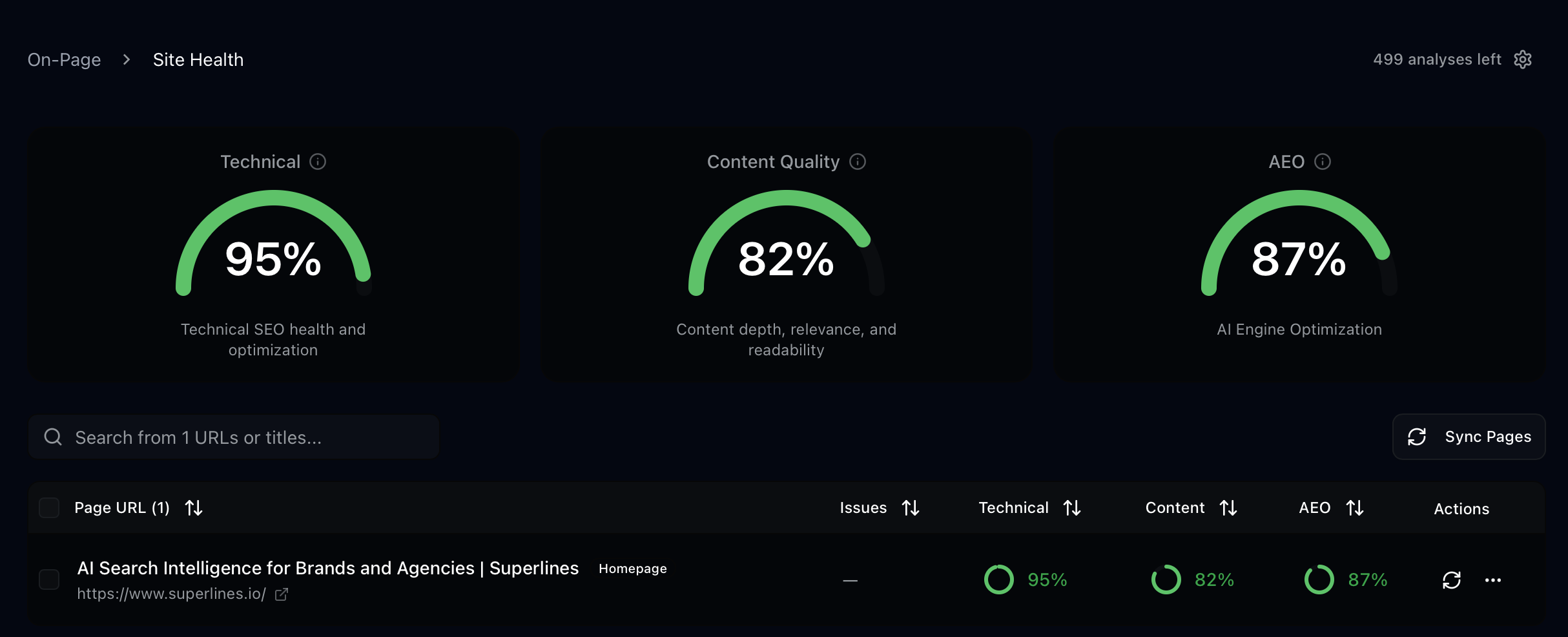
This is where Superlines’ page-level audit tools come in. Instead of guessing what’s wrong with a page, you can run a diagnostic in AI Search Checker that examines the specific factors AI engines evaluate when deciding whether to cite content.
Running a comprehensive audit
The Superlines webpage audit analyzes a page across multiple dimensions:
- Content quality — Heading structure, answer directness, data citations, tone, writing quality
- Technical markup — Metadata, JSON-LD structured data, heading hierarchy, accessibility
- AI search optimization — Schema completeness, content organization for LLM parsing, marketing message balance
What a content audit reveals
When you audit a page, you get specific scores and findings across these dimensions. Here is an example of what audit findings look like and how to interpret them:
Heading structure issues:
| Finding | What it means | How to fix |
|---|---|---|
| H1 is a statement, not a question | AI engines match headings to search queries. A question-format H1 is more likely to get cited for that exact query | Rewrite H1 as the question your target audience asks |
| H2s don’t match search queries | Sub-headings like “Features” or “About Us” don’t match anything users ask AI | Rewrite H2s as natural language questions: “How does [tool] compare to alternatives?” |
| No H3 depth | Pages with only H1/H2 are less thoroughly structured than competitors | Add H3 sub-sections that address specific aspects of each H2 topic |
Content organization issues:
| Finding | What it means | How to fix |
|---|---|---|
| No external data citations | AI engines view pages with third-party data as more authoritative | Add 3-5 statistics from credible sources with inline links |
| Long paragraphs without structure | AI models parse lists and tables more reliably than paragraph text | Break content into lists, tables, and short paragraphs (3-4 sentences max) |
| Promotional tone detected | Pages that read like sales copy are less likely to be cited as objective sources | Shift to an informational tone. State facts and comparisons rather than claims |
Technical markup issues:
| Finding | What it means | How to fix |
|---|---|---|
| Missing or weak meta description | AI engines use meta descriptions as content summaries | Write a meta description that directly answers the page’s primary question |
| No JSON-LD structured data | Structured data helps AI engines categorize and parse your content | Add schema markup (covered in Step 4) |
| Missing FAQ schema | FAQ content maps directly to the question-answer format AI uses | Add FAQ schema for any question-answer content on the page |
Running a focused audit
If you already know whether the problem is content or technical, you can run a focused audit:
- Content audit — Analyzes heading format, content organization, data citations, tone, and writing quality. Use this when the page exists and has content but isn’t being cited.
- Technical audit — Analyzes metadata, structured data, heading structure, and accessibility. Use this when you want to check the markup and technical foundation.
Example: Diagnosing a non-cited page
Suppose your competitive gap analysis shows that the prompt “best dashboards for AI search visibility” generates 347 AI responses with Semrush at 53% visibility and your brand at 0%. You have a page about your dashboard features, but it is not being cited.
Running an audit on that page might reveal:
- The H1 is “Dashboard Features” (a navigation label, not a question that matches a search query)
- No external statistics or third-party data
- The tone is promotional (“our powerful dashboard”) rather than informational
- No FAQ section
- No JSON-LD structured data
Each of these findings maps to a specific fix. The page isn’t being cited because it is not structured as an authoritative answer to the question AI engines are trying to answer. A page titled “What Are the Best Dashboards for AI Search Visibility?” with external benchmarks, a comparison table, and FAQ schema would perform very differently.
Step 4: Optimize structured data for AI engines
Goal: Add and improve schema markup so AI engines can better understand, categorize, and cite your content.
Where to find this in Superlines: Go to
Tools -> Schema Optimizer(sometimes labeledSchema Optimiser) and run the analysis on the page you are updating.Works outside Superlines too: Superlines helps you diagnose and improve the markup, but you still implement the resulting JSON-LD in your CMS, codebase, or tag manager.
JSON-LD structured data is the language you use to tell AI engines what your page is about in a machine-readable format. While AI engines don’t exclusively rely on schema, pages with well-implemented structured data are easier for them to parse and reference.
Schema types that matter for AI citability
| Schema type | When to use | AI search benefit |
|---|---|---|
| Article | Blog posts, guides, how-to content | Tells AI the content type, author, publish date, and topic |
| FAQPage | Any page with question-answer content | Maps directly to how AI engines structure responses |
| HowTo | Step-by-step guides and tutorials | Helps AI engines cite specific steps from your content |
| SoftwareApplication | Product pages for software tools | Provides structured product information AI can reference |
| Organization | About pages, homepages | Establishes brand identity and authority signals |
| ItemList | Comparison and ranking articles | Structures your comparisons in a format AI can parse |
How to optimize your schema
The Superlines Schema Optimizer analyzes your existing JSON-LD markup and generates an optimized version. Here is what the optimization process looks like:
Before optimization (typical page):
{
  "@context": "https://schema.org",
  "@type": "WebPage",
  "name": "Dashboard Features"
}
This tells AI engines almost nothing useful. The page type is generic, there is no content description, no author, no date, and no topic categorization.
After optimization (AI-ready page):
{
  "@context": "https://schema.org",
  "@type": "Article",
  "headline": "What Are the Best Dashboards for AI Search Visibility in 2026?",
  "description": "A comprehensive comparison of AI search visibility dashboards, including feature analysis, pricing, and independent testing results.",
  "author": {
    "@type": "Organization",
    "name": "Superlines",
    "url": "https://www.superlines.io"
  },
  "datePublished": "2026-02-15",
  "dateModified": "2026-02-19",
  "mainEntityOfPage": {
    "@type": "WebPage",
    "@id": "https://www.superlines.io/articles/best-ai-visibility-tools"
  }
}
Adding FAQ schema for question-answer content:
{
  "@context": "https://schema.org",
  "@type": "FAQPage",
  "mainEntity": [
    {
      "@type": "Question",
      "name": "What is AI search visibility?",
      "acceptedAnswer": {
        "@type": "Answer",
        "text": "AI search visibility measures how often your brand is mentioned and cited in AI-generated responses from platforms like ChatGPT, Gemini, Perplexity, and Copilot."
      }
    },
    {
      "@type": "Question",
      "name": "How do you track brand mentions in ChatGPT?",
      "acceptedAnswer": {
        "@type": "Answer",
        "text": "AI search visibility platforms like Superlines send tracked prompts into AI engines and record every response, measuring brand mentions, citations, sentiment, and position."
      }
    }
  ]
}
Schema optimization checklist
For every page you optimize, verify:
- Primary schema type matches the content format (Article, FAQPage, HowTo, etc.)
- Headline matches the page’s H1 and target query
- Description is a direct, factual summary — not marketing copy
- Author and organization are specified with URLs
- datePublished and dateModified are current
- FAQ schema exists for any question-answer content on the page
- If it is a comparison article, ItemList schema is present
Step 5: Apply the four content templates AI engines cite most
Goal: Use proven content formats that match the way AI engines structure their responses.
Where to find this in Superlines: Use the insights from
Analytics -> Citations, your competitive analysis views, and content opportunity reports to decide which template matches the gap you found.Works outside Superlines too: This step is content design work, not a dashboard feature. Apply these templates in your CMS, blog, docs site, or landing page workflow.
Analysis of the most-cited pages across AI search reveals four dominant formats. When AI engines need to answer a question, they look for content in these structures:
Template 1: The comprehensive comparison
This is the single most cited content type in AI search. When a user asks “What’s the best [category] tool?”, AI engines look for comparison articles that evaluate multiple options.
Structure:
# What Are the Best [Category] Tools in 2026?

[Direct 2-3 sentence answer naming the top picks]

## TL;DR: Top 3 Picks

| Tool | Best for | Starting price | Key differentiator |
|------|----------|---------------|-------------------|
| Tool A | [use case] | $X/mo | [unique feature] |
| Tool B | [use case] | $X/mo | [unique feature] |
| Tool C | [use case] | $X/mo | [unique feature] |

## How We Evaluated

[Methodology section — what criteria, how tested, what data used]

## 1. Tool A — Best for [Use Case]
### Key features
### Pricing
### Pros and cons

## 2. Tool B — Best for [Use Case]
[Same structure]

## Frequently Asked Questions
[5 questions with 2-3 sentence answers]
Why this works for AI: The direct answer gives AI the synthesis. The table gives it structured data to reference. The methodology section signals authority. The per-tool sections provide depth for follow-up citations.
Template 2: The “alternative to [competitor]” page
These are the highest-converting pages in AI search because users asking for alternatives are in active buying mode.
Structure:
# Best [Competitor] Alternatives in 2026

[Competitor] is [brief fair description]. Here are the best
alternatives depending on what you need.

## Why Look for a [Competitor] Alternative?
[Honest assessment of competitor limitations — not attack content]

## Quick Comparison

| | [Competitor] | Alternative 1 | Alternative 2 | Alternative 3 |
|--|-------------|---------------|---------------|---------------|
| [Feature 1] | ✓/✗ | ✓/✗ | ✓/✗ | ✓/✗ |
| [Feature 2] | ✓/✗ | ✓/✗ | ✓/✗ | ✓/✗ |
| Starting price | $X | $X | $X | $X |

## 1. [Alternative 1] — Best for [Use Case]
## 2. [Alternative 2] — Best for [Use Case]
## 3. [Alternative 3] — Best for [Use Case]

## How to Migrate from [Competitor]
[Practical transition guidance]
Why this works for AI: AI engines give heavy weight to content that directly answers “alternative to X” queries. The fair assessment of the competitor signals objectivity, which increases citation likelihood. The comparison table gives AI structured data to cite.
Template 3: The definitive guide
For problem-solving and informational queries like “how to track brand visibility in AI search.”
Structure:
# How to [Accomplish Goal]

[Direct answer in 2-3 sentences]

## TL;DR

- Key point 1
- Key point 2
- Key point 3
- Key point 4
- Key point 5

## What is [Topic]?
[Definition with external data: "According to [source], X% of..."]

## Step 1: [First Action]
[Concrete instructions with examples]

## Step 2: [Second Action]
[Concrete instructions with examples]

## Common Mistakes to Avoid
[Practical guidance that shows expertise]

## Frequently Asked Questions
[5 questions with concise answers]
Why this works for AI: The direct answer and TL;DR give AI a synthesis to cite. The step-by-step structure matches HowTo schema. External data citations signal authority.
Template 4: The data-driven analysis
For queries where users want insights, not instructions — like “what are the trends in AI search.”
Structure:
# [Topic]: [Year] Data and Analysis

[Key finding in 2-3 sentences with supporting number]

## Key Findings

1. [Finding with stat]: [Source]
2. [Finding with stat]: [Source]
3. [Finding with stat]: [Source]

## Methodology
[How the data was gathered — builds trust]

## Finding 1: [Headline]
[Data, chart description, interpretation]

## Finding 2: [Headline]
[Data, chart description, interpretation]

## What This Means for [Audience]
[Practical implications]
Why this works for AI: Original data and analysis is the highest-authority content type. AI engines preferentially cite primary research over secondhand summaries. The methodology section is a strong trust signal.
Matching templates to your opportunities
When you review your competitive gaps and content opportunities in Superlines, each gap maps to one of these templates:
| Opportunity type | Template to use |
|---|---|
| Category-defining prompt (“best [category] tools”) | Comprehensive comparison |
| Competitor alternative prompt | ”Alternative to” page |
| Problem-solving prompt (“how to [do thing]“) | Definitive guide |
| Trend/insight prompt (“what are the trends in [topic]“) | Data-driven analysis |
Step 6: Get automated strategic recommendations
Goal: Use Superlines’ built-in intelligence to surface prioritized actions you might miss in manual analysis.
Where to find this in Superlines: If you want dashboard-based recommendations, start in
Analytics -> Agentfor ongoing findings and next steps. The Strategic Action Plan example below uses the Superlines MCP server, so treat it as an advanced workflow for MCP users rather than a dashboard-only step.
Beyond manual dashboard review, Superlines offers two automated recommendation systems that analyze your data and surface specific, prioritized actions.
The Strategic Action Plan
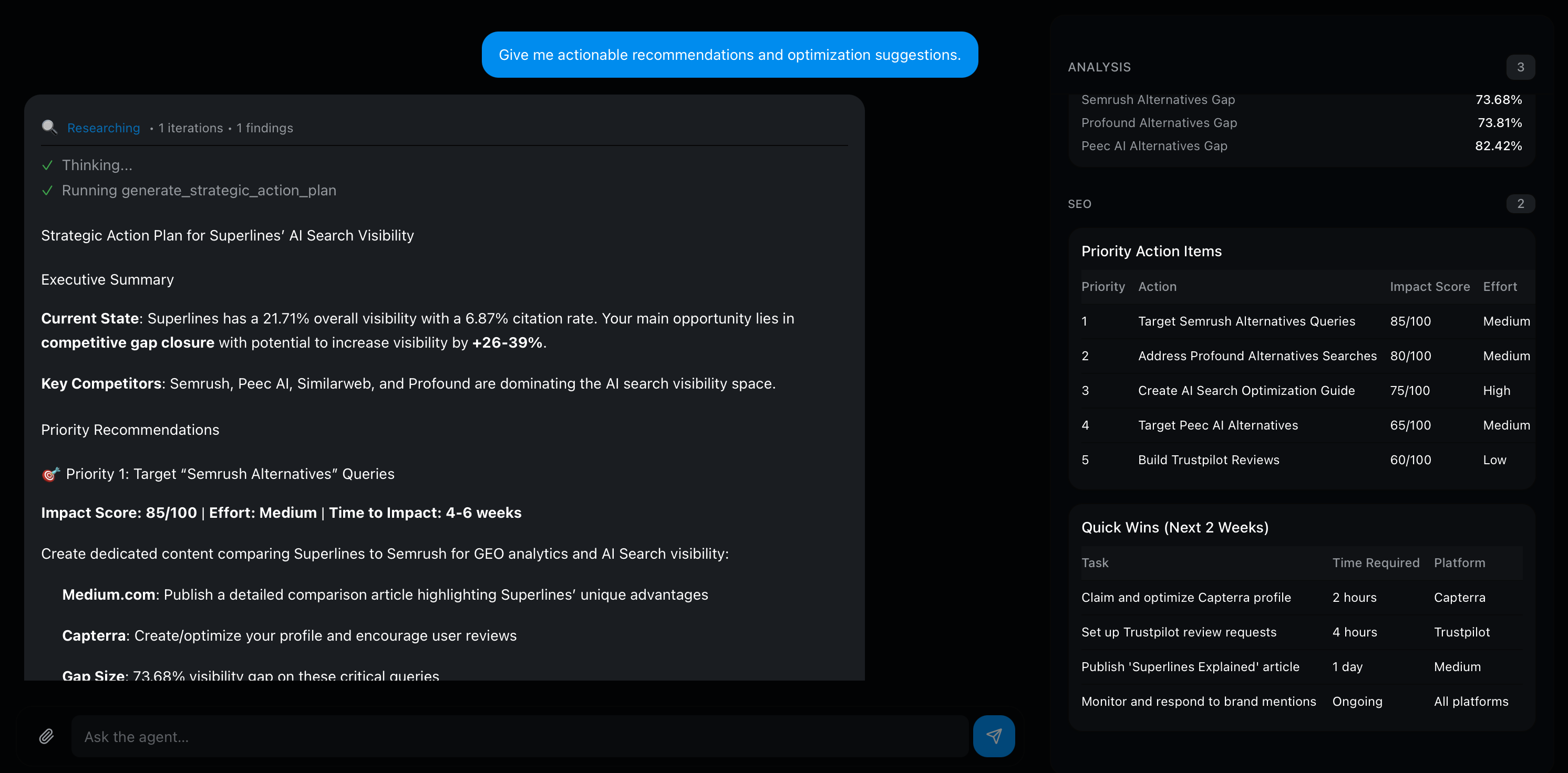
The strategic action plan generates a priority-ranked list of recommendations based on your current data. It analyzes your brand visibility, citation rates, competitive gaps, and content opportunities, then produces a Semrush-style action plan with improvement potential scores.
For clarity: the workflow in this section is shown through the Superlines MCP server. If you are a non-technical dashboard user, use Analytics -> Agent for ongoing recommendations and treat the MCP action plan as an optional advanced layer.
You can focus the plan on a specific area:
| Focus area | What it analyzes | When to use |
|---|---|---|
| All | Complete analysis across all dimensions | Monthly strategic review |
| Visibility | Where to increase brand mentions | When BV is flat or declining |
| Citations | Where to earn more links from AI responses | When CR is falling while BV holds |
| Sentiment | How to improve how AI describes your brand | When sentiment drops |
| Content gaps | Topics where you have high volume but low visibility | When planning content calendar |
Each recommendation comes with an improvement potential score, making it clear which actions will produce the largest gains. This removes the guesswork from prioritization — instead of deciding between 20 different content ideas, you can see which 3-5 will move the needle most.
Using the competitorUrls parameter for targeted competitive analysis
When using the Strategic Action Plan via the Superlines MCP server, you can pass specific competitor URLs to the generate_strategic_action_plan tool using the competitorUrls parameter. This is MCP-only and instructs the plan to analyze those specific pages — not just the competitor brand as a whole — and generate recommendations tailored to beating them on their strongest content assets.
This is most valuable when you know exactly which competitor pages are winning citations for your key prompts. Run this in your MCP-connected AI tool:
Generate a strategic action plan for "YourBrand" focused on citations.
Target these specific competitor URLs that are beating us on our key prompts:
- competitorUrls: ["https://competitor.com/their-winning-page", "https://other.com/comparison-article"]
maxRecommendations: 5
The plan will analyze what makes those specific URLs effective for AI citations and generate recommendations tailored to outperforming them. This is significantly more actionable than a general plan because the recommendations directly address what the AI engines find authoritative about the competition.
The Agent
The Agent is an AI assistant chat interface found under Analytics -> Agent. You can ask it questions about your data, competitors, and run audits, scrapes, or schema optimization — all from a conversational interface. Unlike the strategic action plan (which is a point-in-time analysis), the Agent lets you explore your data interactively and surface findings on demand.
When to use each
| Situation | Tool to use |
|---|---|
| Monthly content planning session | Strategic Action Plan focused on content gaps |
| Weekly review to find quick wins | Agent — ask about recent changes and quick wins |
| Preparing a report for leadership | Strategic Action Plan (all areas) for comprehensive overview |
| Diagnosing a sudden drop in metrics | Agent — ask what changed and when |
| Building a quarterly roadmap | Both — action plan for priorities, Agent for ad-hoc data exploration |
Step 7: Measure whether your optimization worked
Goal: Compare before-and-after metrics to prove that your content changes actually improved AI search visibility.
Where to find this in Superlines: Open the relevant analytics view, then use the date range picker in the filter bar below the main tabs with the
7d,30d, or60dpresets to set your window. If your workspace shows a compare control, enable it there. If not, export one time window, switch the date range, and compare equal-length periods side by side.
This is where most GEO efforts fail — not because the work doesn’t produce results, but because no one measures the impact properly. Superlines’ period comparison lets you compare any two time periods side by side.
Setting up a measurement window
When you publish or optimize a page, note the date. Then wait 14-21 days before measuring — AI engines need time to index new content and adjust their citation patterns.
Compare the current period against the previous period of the same length. A 30-day comparison is the most common:
| Metric | Previous 30 days | Current 30 days | Change | Interpretation |
|---|---|---|---|---|
| Brand Visibility | 1.4% | 1.7% | +0.3% | Mentions are growing — content is being picked up |
| Citation Rate | 5.4% | 5.0% | -0.4% | Citations are declining — page quality may need work |
| Average Position | 6.2 | 4.8 | -1.4 | Cited earlier in AI responses — content authority is rising |
| Sentiment | 77% positive | 64% positive | -13% | Warning — check what competitors published |
What each metric movement means
BV up, CR up: Your content is being found and trusted. Keep doing what you are doing.
BV up, CR down: AI mentions your brand more, but links to you less. This is a trust signal problem. Your pages are being referenced but not cited as primary sources. Strengthen the cited pages with external data, fresher statistics, and clearer authority signals.
BV flat, CR up: AI is not mentioning you more, but when it does, it cites you more reliably. This means your content quality improved but your reach has not expanded. Publish more content targeting new prompts.
BV down, CR down: Both declining is the most serious signal. Check whether a competitor published a major piece of content that shifted AI responses, or whether your pages became stale. Run a content health audit to identify what to update.
Tracking at the prompt level
Period comparison is most powerful when applied to specific prompts, not just overall metrics. If you optimized a page targeting “best AI search visibility dashboards,” compare the metrics for that specific prompt:
| Before optimization | After optimization (30 days) | |
|---|---|---|
| Visibility on this prompt | 0% | 5% |
| Citations on this prompt | 0 | 12 |
| Position when mentioned | — | 8.0 |
This prompt-level before/after measurement is the proof that your optimization worked — or the signal that you need a different approach.
Using trend annotations
Every time you publish or optimize a page, add an annotation on the Superlines trend charts when that control is available in your workspace. This creates a timestamp marker that lets you visually correlate content actions with metric changes. Without annotations, you end up guessing what caused a jump or drop weeks after the fact.
Exporting measurement data
All Superlines analytics views support CSV and JSON export. Use this to:
- Create before/after snapshots: Export data before you begin a round of optimization, then export again after 30 days. Compare the two files to produce a precise record of which metrics moved.
- Build external dashboards: Export to a spreadsheet or BI tool to combine AI search metrics with your other marketing data (revenue, pipeline, web analytics).
- Share with stakeholders: Export prompt-level data for presentations that require specific numbers rather than dashboard screenshots.
To export, navigate to any analytics view in the Superlines dashboard and use the Export button. Choose CSV for spreadsheet tools or JSON for programmatic processing.
Step 8: Scale with automated content intelligence
Goal: Move from manual one-page-at-a-time optimization to a systematic process that catches gaps and decay automatically.
Where to find this in Superlines: This step goes beyond the core dashboard workflow. It requires MCP setup and/or the separate AEO Agent project. If you only want the manual dashboard process, Steps 1-7 are the complete workflow.
Manual optimization works for 5-10 pages. But if you have 50+ pages and 300+ tracked prompts, you need a system that monitors, audits, and flags content automatically.
The AEO Agent pipeline
The Superlines AEO Agent runs a daily 7-phase pipeline that automates the manual process described in this guide:
| Manual step in this guide | AEO Agent phase | What it automates |
|---|---|---|
| Step 2: Identify pages to optimize | Phase 1: Intelligence Gathering | Pulls citation data and competitive gaps daily |
| Step 3: Audit a page | Phase 3: Content Health Audit | Flags stale, outdated, or structurally weak content |
| Check factual accuracy | Phase 4: Fact-Check | Extracts pricing, statistics, and dates from articles and verifies them against live sources |
| Step 5: Create new content | Phase 7: Content Actions | Generates article drafts in your CMS, always as drafts for human review |
| Monitor competitor changes | Phase 2: Competitive Deep Dive | Scrapes top competitor URLs and analyzes what changed |
| Find new content ideas | Phase 5: Industry Insights | Researches trending topics across web and Reddit |
The agent uses three specialized sub-agents that each carry only the tools they need:
┌──────────────┐    ┌──────────────┐    ┌──────────────┐
│   Analyst     │    │  Researcher   │    │ Content Mgr   │
│               │    │               │    │               │
│ • Metrics     │    │ • Web scrape  │    │ • CMS read    │
│ • Citations   │    │ • Search      │    │ • CMS write   │
│ • Gaps        │    │ • Fact-check  │    │ • Page audit  │
│ • Trends      │    │ • Reddit      │    │ • Schema opt  │
└──────┬────────┘    └──────┬────────┘    └──────┬────────┘
       │                    │                     │
       └────────────┬───────┘                     │
                    │                             │
            ┌───────▼─────────────────────────────▼──┐
            │          Daily Pipeline Run             │
            │  Intelligence → Research → Audit →      │
            │  Fact-check → Insights → Data →         │
            │  Content Actions                        │
            └─────────────────────────────────────────┘
The critical design decision: all new content is created as a draft and never auto-published. The agent surfaces opportunities and does the heavy lifting, but a human reviews every article before it goes live.
What the agent produces daily
Each run generates:
- A daily report with metrics, competitive changes, and content recommendations
- CMS updates — fact corrections, freshness updates to existing articles
- New article drafts (maximum 1 per run) targeting verified content gaps
- Flagged content — articles needing human attention (stale data, declining citations)
Over weeks, this creates a compounding effect. Every gap gets filled. Every outdated fact gets corrected. Every competitive signal gets acted on. The manual process in Steps 1-7 of this guide becomes the agent’s daily routine.
Getting started with the agent
- Non-technical users: Start with the beginner setup guide — a click-by-click walkthrough for setting up MCP and the AEO Agent in
30-45 minutes - Developers: Start with the full build guide — build the 7-phase pipeline from scratch with Mastra, Sanity CMS, and Superlines MCP
Bringing it together: The optimization cycle
GEO is not a one-time project. It is a recurring cycle of audit, optimize, publish, measure, and repeat. Here is how the steps in this guide connect into that cycle:
    ┌─── Step 1: Build prompt portfolio ───┐
    │                                      │
    ▼                                      │
Step 2: Identify pages to optimize         │
    │                                      │
    ▼                                      │
Step 3: Audit pages for AI readiness       │
    │                                      │
    ▼                                      │
Step 4: Optimize structured data           │
    │                                      │
    ▼                                      │
Step 5: Create/rewrite content             │
    │                                      │
    ▼                                      │
Step 7: Measure impact (14-21 days)        │
    │                                      │
    └──────────────────────────────────────┘
Step 6 (automated recommendations) and Step 8 (the AEO Agent) accelerate this cycle by surfacing what to work on next and handling the repetitive parts of content production.
The most important thing is to start the cycle. Pick one page. Audit it. Fix the three most impactful issues. Measure the result after three weeks. That single cycle will teach you more about how AI search citability works for your brand than any amount of dashboard reading.
What to read next
- Practical Generative Engine Optimization — How to read AI search data and identify opportunities
- Build a GEO + SEO Marketing Agent in Claude Desktop — Combine AI search and traditional SEO analysis with MCP servers
- Build an Agentic AEO Content Pipeline — The full developer guide to the 7-phase AEO Agent