AI Search Intelligence for Agencies: From Pitching to Scaling Client Services with Superlines
A complete guide for agencies on using Superlines to pitch AI search services, onboard clients, manage multiple brands, deliver recurring reports, and scale operations — including cross-organization collaboration and MCP-powered automation.


Table of Contents
Why agencies need AI search data
AI search is creating a new category of marketing service. When a potential customer asks ChatGPT, Gemini, or Perplexity “What is the best project management tool?”, the answer they get is not a list of ads or blue links — it is a direct recommendation. Brands that appear in these AI-generated responses capture attention at the moment of decision. Brands that do not appear, do not exist in that conversation.
Most clients have no idea how their brand appears in AI search. They do not know:
- Whether AI models mention them at all
- What AI models say about them when they do
- Which competitors dominate the AI-generated answers in their category
- Which of their pages get cited as sources
This information gap is the agency opportunity. You can show clients something they have never seen before — their AI search footprint — and build a recurring service around monitoring, analyzing, and improving it.
How Superlines is structured for agencies
Before diving into workflows, it helps to understand how Superlines organizes data. The hierarchy is:
Organization
├── Subscription & billing
├── Team members (Owner, Admin, Member)
├── API keys & MCP access
├── AI engine configuration
│
├── Brand A (e.g., "Client X")
│   ├── Website URL
│   ├── Markets (up to 3: Primary Market, Market 2, Market 3)
│   ├── Competitors (up to 4)
│   ├── Tracked prompts
│   └── Analytics data
│
├── Brand B (e.g., "Client Y")
│   └── ...
│
└── Brand C (e.g., "Prospect Z")
    └── ...
Organization is the top-level container. It holds your subscription plan, team members, API keys, and determines which AI engines (ChatGPT, Gemini, Perplexity, etc.) you can monitor.
Brand represents a single monitored entity — a client, a product line, or a business unit. Each brand has its own name, website, up to 3 markets (each with country and language), competitors, tracked prompts, and independent analytics.
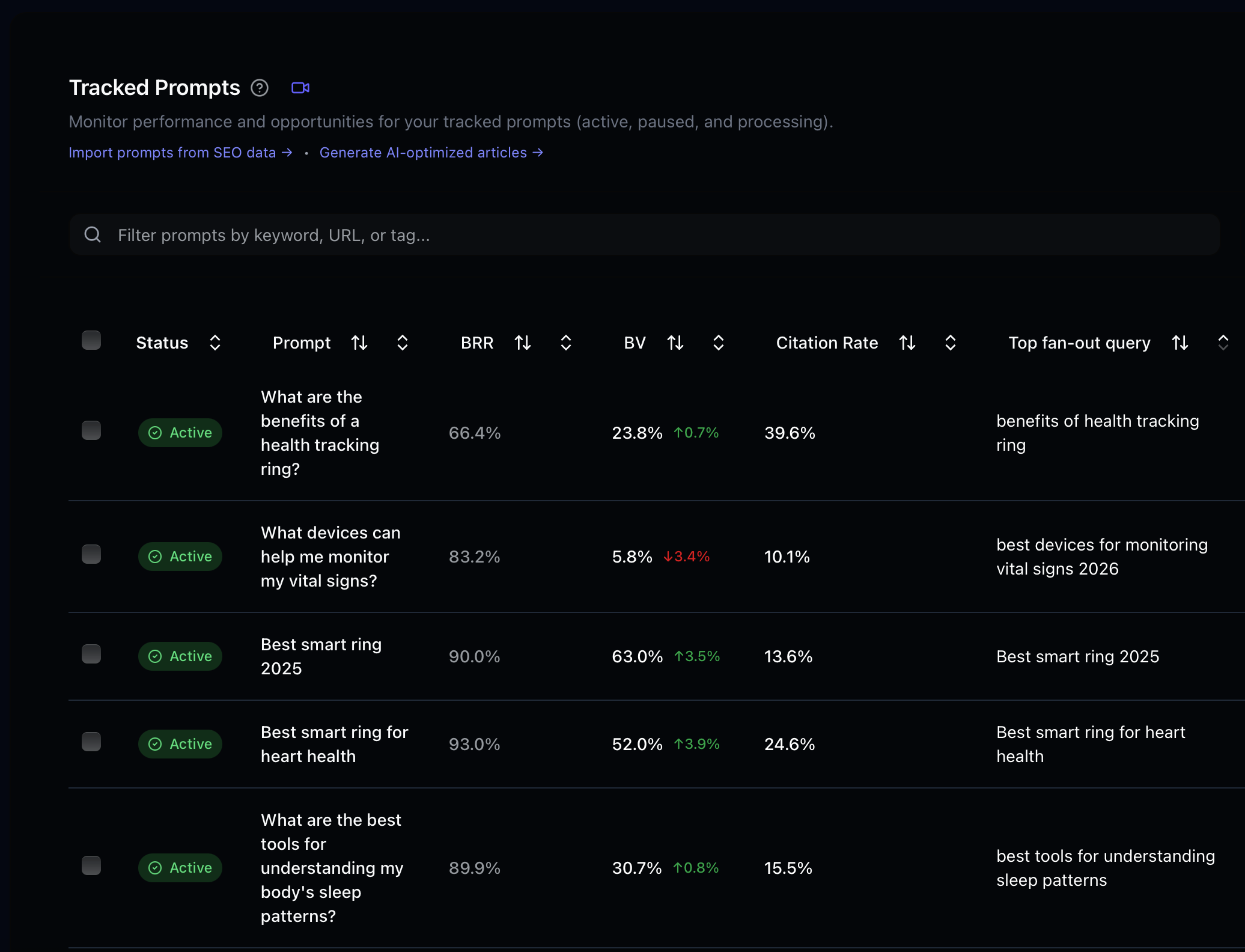
Prompts are the AI search queries you track. When you create a brand, Superlines auto-generates relevant prompts based on the industry, audience, and competitors. You can add, pause, label, and import prompts manually or in bulk.
Team members can be scoped to specific brands. An account manager can see only their clients’ data while the agency lead sees everything.
This structure is designed for multi-client management. One agency organization can hold all clients as separate brands, with team members scoped to the brands they manage.
Phase 1: Winning new business
The fastest way to demonstrate AI search value to a prospect is to show them their own data. Superlines makes this possible in under 10 minutes.
Create a brand for the prospect
When you are preparing for a pitch or responding to an RFP, create a new brand in your Superlines account for the prospect:
- Click Add New Brand from the brand switcher in the sidebar
- Enter the prospect’s website URL (e.g., “acme.com”)
- Superlines creates the brand and opens Brand Settings — review the detected brand name and adjust if needed
- Set their primary market (country and language) and add 2–4 competitors
- Save the configuration
Superlines immediately begins:
- Scanning the prospect’s website to understand their business
- Auto-generating relevant tracked prompts based on their industry
- Testing those prompts across AI engines (ChatGPT, Perplexity, Copilot, etc.)
- Measuring brand visibility, citations, sentiment, and competitive position
Within 24-48 hours, you have a complete AI search visibility profile for a brand that has never been monitored before.
The pitch snapshot
Once data starts flowing in (even partial data is useful), you can generate a prospect snapshot. If you have the Superlines MCP server connected to Claude Desktop or Cursor, run this prompt:
Create an AI search visibility snapshot for "[Prospect Brand]":

1. Get the overall analytics summary — brand visibility score, citation
   rate, and mention count
2. Analyze metrics grouped by LLM service — show which AI platforms
   mention this brand (ChatGPT, Gemini, Perplexity, Copilot)
3. Get competitor insights — which competitors appear more often in AI
   responses?
4. Analyze sentiment — when AI models mention this brand, is the tone
   positive, neutral, or negative?
5. Find the top 5 content opportunities — topics where AI models answer
   questions about their industry but do not cite this brand
6. Get the top 3 competitive gaps — specific queries where a competitor
   outperforms them

Format this as a one-page executive briefing with:
- A headline metric: "Your brand appears in X% of AI-generated responses
  in your category"
- Platform breakdown (which AI models mention them, which do not)
- Competitive position chart (brand vs top 3 competitors by visibility)
- 3 biggest missed opportunities
- What this means in plain business terms
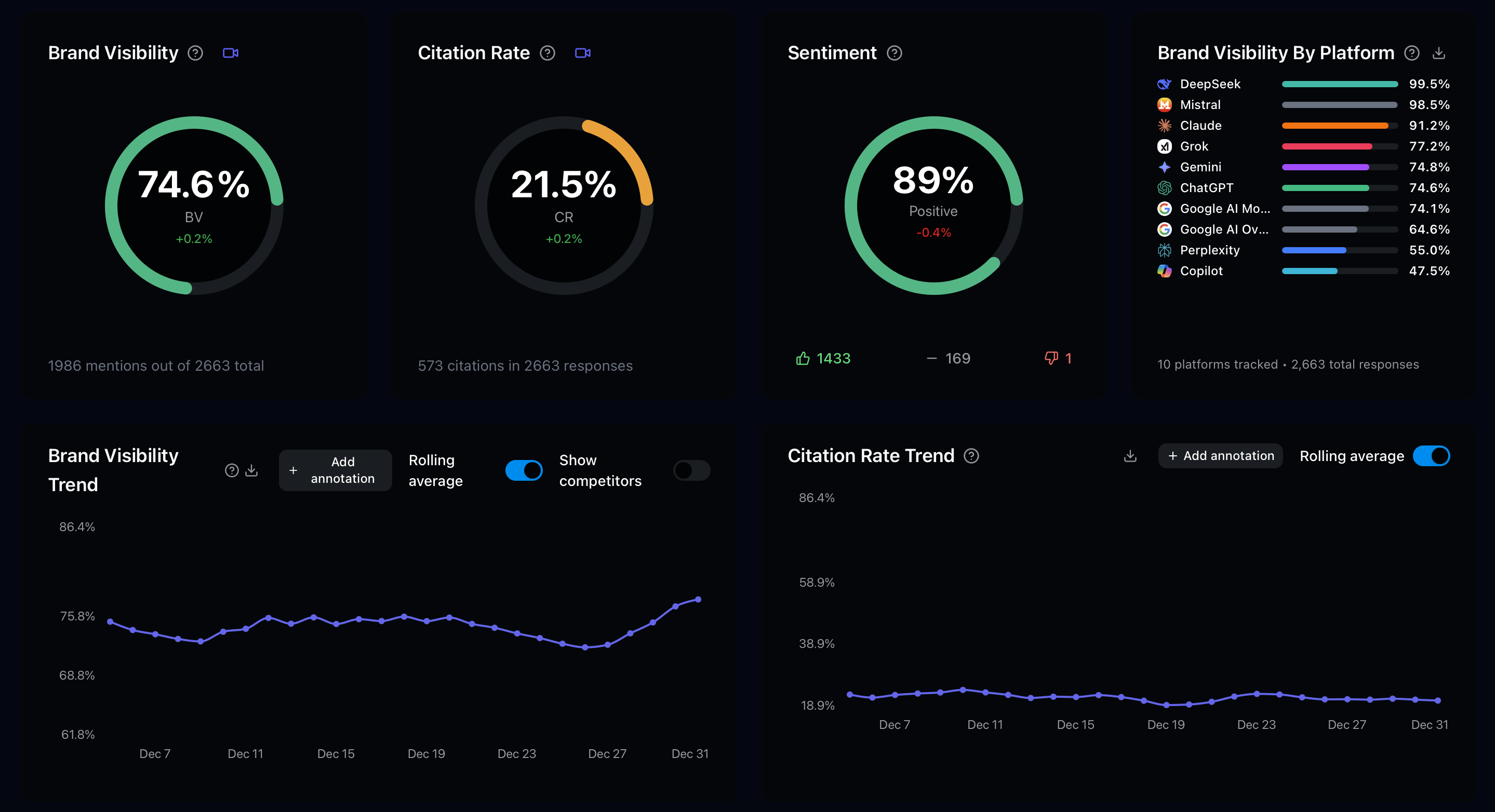
This produces a deliverable you can present in a pitch meeting. The prospect sees data they have never seen before, about their own brand, and you are the one showing it to them.
Pitch without MCP (dashboard only)
If you do not use the MCP server, the same data is available in the Superlines dashboard:
- Switch to the prospect’s brand using the brand switcher in the sidebar
- Open the Visibility page — brand visibility score, trends, and platform breakdown
- Open Competitor Analysis — share of voice against competitors
- Check the Prompt Radar and Agent pages for content gaps — topics with high volume but low visibility
- Export charts and data as needed for your pitch deck
The MCP approach is faster for generating formatted reports, but the dashboard works for visual presentations and screen shares.
What makes a compelling pitch
Based on what typically resonates with prospects:
| Data point | Why it matters to prospects |
|---|---|
| Brand visibility score | ”You appear in only 12% of relevant AI conversations — your competitor appears in 47%“ |
| Platform gaps | ”You are completely absent from Perplexity responses, which is the fastest-growing AI search engine” |
| Competitor citation analysis | ”Your competitor’s pricing page gets cited 3x more often than yours in comparison queries” |
| Sentiment | ”When AI models mention you, 30% of mentions are negative vs 5% for your competitor” |
| Content opportunities | ”There are 15 high-volume queries in your category where no competitor has strong visibility — first-mover advantage” |
The pitch is not “you need AI search optimization.” The pitch is “here is what AI is telling your potential customers about you right now, and here is what it is telling them about your competitors.”
Phase 2: Client onboarding
Once a prospect becomes a client, the brand you created for the pitch becomes their production account. Now you need to configure it properly.
Review and refine brand settings
The initial setup for the pitch was fast. Now take the time to configure everything correctly:
Brand name variations: Add all the ways customers might refer to this brand. If the brand is “HubSpot,” add “Hubspot,” “Hub Spot,” “HubSpot CRM” as variations. This improves mention detection accuracy.
Brand exclude list: If the brand name is a common word (like “Monday” for Monday.com), add exclusion terms to prevent false positive mentions.
Competitor mappings: For each competitor, set up canonical names and aliases. If a competitor is “Salesforce,” add “SFDC,” “Salesforce CRM,” “Salesforce.com” as aliases. This ensures accurate share of voice calculations.
Market configuration:
- Primary Market — Set to the client’s main market (country and language). This determines which prompts are generated and how responses are analyzed.
- Additional markets — Each brand supports up to 3 markets total (Primary Market, Market 2, Market 3). Use the Add Market button in Brand Settings to add additional markets. For clients with 3 or fewer markets, you can track them all within a single brand instead of creating separate brands.
- For clients in 4+ markets, create separate brands per additional market (e.g., “Client X — APAC”).
- Target audience — Describe the client’s ideal customer in detail. This improves auto-generated prompt relevance.
Build the prompt portfolio
The auto-generated prompts are a starting point. A strong prompt portfolio for a client should cover:
| Journey stage | Example prompts | Typical count |
|---|---|---|
| Awareness | ”What is [category]?”, “Why do companies use [category]?“ | 10-20 |
| Consideration | ”Best [category] tools”, “Top [category] for [use case]“ | 20-40 |
| Decision | ”[Brand] vs [Competitor]”, “[Brand] pricing”, “[Brand] reviews” | 15-25 |
| Retention | ”How to use [Brand] for [task]”, “[Brand] alternatives” | 10-15 |
Add prompts in bulk using the CSV import or paste feature:
- Go to Dashboard > Tracked Prompts > Add Prompt > Bulk Import
- Upload a CSV or paste prompts line by line
- Review and confirm
Use labels to organize prompts by category, campaign, or priority:
funnel:awareness,funnel:consideration,funnel:decisionproduct:crm,product:marketing-hubpriority:high,priority:medium
Labels make it easy to filter analytics later — you can see “How is our visibility for decision-stage queries?” without sifting through everything.
Use MCP to expand the portfolio:
I manage the brand "[Client Brand]" in the [industry] space. Review my
current tracked prompts and suggest 20 new ones I should add. Cover all
journey stages (awareness, consideration, decision, retention) and include
non-branded queries where competitors might be winning.

For each suggestion, include:
- The prompt text
- Journey stage
- Intent type (informational, commercial, navigational)
- Recommended label
Set up team access
For the client engagement to work, the right people need access to the right data:
Agency team members:
- Account Manager → Admin role, scoped to this client’s brand(s)
- SEO/Content Specialist → Member role, scoped to this client’s brand(s)
- Agency Lead → Admin role, full access to all brands
Client stakeholders (optional at this stage):
- Client Marketing Lead → Member role, scoped to their brand(s)
- Read-only access lets them see their own data without modifying configurations
To scope a team member to specific brands: when inviting or editing a member, select Scoped access and choose which brands they can see.
Phase 3: Multi-client management
As your agency grows, managing 5, 10, or 50 clients requires structure. Here is how to organize Superlines for scale.
Organization model: Agency-owned
The simplest model is a single agency organization that holds all clients as brands:
Agency Organization (your subscription)
├── Client A — US Market
├── Client A — UK Market
├── Client B
├── Client C
├── Client D — Product Line 1
├── Client D — Product Line 2
└── Prospect X (pitch in progress)
When this works well:
- You manage everything — billing, configuration, reporting
- Clients do not need direct access to the dashboard (you deliver reports)
- You want centralized control over all data
- Simpler billing — one subscription covers all clients
When it gets limiting:
- A client wants to own their data independently
- A client works with multiple agencies and needs to share access
- A client wants to take their account with them if the engagement ends
Organization model: Client-owned
For larger or more sophisticated clients, the client owns their Superlines organization and invites your agency team as members:
Client X Organization (client's subscription)
├── Client X — US Market
├── Client X — UK Market
├── Client X — Enterprise Division
│
├── Team: Client CMO (Owner)
├── Team: Client Marketing Manager (Admin)
├── Team: Agency Account Manager (Admin)
└── Team: Agency SEO Specialist (Member)
When this works well:
- The client retains full ownership and control of their data
- The client can work with multiple agencies, each scoped to different brands
- If the engagement ends, the client keeps everything — data, history, prompts
- Enterprise clients often require this model for data governance reasons
How to set it up:
- The client creates their own Superlines organization and subscribes
- The client invites your agency team members by email
- The client assigns your team the appropriate roles (Admin or Member)
- The client can scope your access to specific brands if they have multiple
Your agency team then has access across multiple organizations:
- Your own agency organization (for your own brand, internal use, and pitch prospects)
- Client X’s organization (working on their brands)
- Client Y’s organization (working on their brands)
Each team member switches between organizations in the Superlines sidebar.
Hybrid model
Many agencies use both approaches:
| Client type | Model | Reason |
|---|---|---|
| Small businesses, early engagements | Agency-owned | Simpler for the client, agency controls everything |
| Mid-market clients | Agency-owned with client viewer access | Client sees their data, agency manages config |
| Enterprise clients | Client-owned with agency collaboration | Client needs data ownership, compliance, multi-vendor support |
| Pitch prospects | Agency-owned (temporary brand) | Quick setup for new business, convert or remove later |
Managing prompt quotas across clients
Prompts are the primary resource to manage. Each organization has a prompt quota shared across all brands within it.
In the agency-owned model: Your single subscription’s prompt quota covers all clients. If Client A uses 200 prompts and Client B uses 150, your organization total is 350. Monitor usage in Prompt Management and pause low-performing prompts to free quota.
In the client-owned model: Each client’s subscription has its own prompt quota. Your agency does not consume your own quota when working in a client’s organization.
Tips for managing quotas efficiently:
- Pause seasonal prompts when they are not relevant (holiday campaigns, seasonal products)
- Use labels to identify prompt tiers — track your highest-priority prompts year-round and rotate lower-priority ones
- Remove duplicates — auto-labeling can flag near-duplicate prompts
- Focus decision-stage prompts on the most commercially valuable queries
Phase 4: Ongoing service delivery
With clients onboarded and properly configured, the ongoing value comes from regular analysis, reporting, and optimization. Here are the core agency deliverables.
Monthly AI search performance report
This is the anchor deliverable for most agency engagements. Using the MCP server:
Create a monthly AI search performance report for "[Client Brand]":

1. Get period comparison — last 30 days vs previous 30 days for brand
   visibility, citation rate, share of voice, and mentions
2. Get weekly performance for the last 4 weeks — show the trend line
3. Analyze metrics grouped by LLM service — which platforms are
   improving or declining?
4. Get the best performing prompts — top 5 queries where the client
   has the strongest visibility
5. Get competitive gaps — top 5 queries where competitors outperform
   the client, with AI analysis enabled
6. Analyze sentiment — overall split and any changes from last month
7. Get citation data aggregated by domain — which of the client's
   domains/URLs get cited most?
8. Find content opportunities — new gaps identified this month

Structure as a client-ready monthly report:

Executive Summary:
- One paragraph summarizing the month
- 3 key wins
- 3 areas needing attention
- Headline metric change (e.g., "Brand visibility up 8% month-over-month")

Performance Section:
- Brand visibility trend (4-week chart description)
- Citation rate trend
- Share of voice vs competitors
- Platform-by-platform breakdown

Competitive Landscape:
- Movement in competitive rankings
- New threats or opportunities identified
- Specific queries where the client gained or lost ground

Content Performance:
- Top cited URLs (which client pages are working)
- Content gaps (topics to address)
- Pages that need optimization

Recommendations:
- 3 actions ranked by expected impact
- Timeline for each (this week / this month / this quarter)
Quarterly strategic review
Every quarter, run a deeper analysis that informs the next quarter’s strategy:
Run a quarterly strategic review for "[Client Brand]":

1. Generate a strategic action plan — use generate_strategic_action_plan
   with the last 90 days of data
2. Pull a before-vs-after performance view with get_period_comparison so
   you can explain what actually changed this quarter
3. Analyze the competitive landscape shift over 90 days — use
   get_competitor_insights and get_competitive_gap to show which rivals gained ground
4. Get fan-out query insights — which web searches do AI models perform
   when answering queries in this client's category?
5. Find all content opportunities — flag anything with high volume
   and visibility below 20

Create a quarterly strategy document:

State of AI Search (where the client stands today):
- Overall visibility score and trajectory
- Position vs competitors
- Strongest and weakest AI platforms

What Changed This Quarter:
- Queries where visibility improved (what drove it)
- Queries where visibility declined (what caused it)
- New competitors that emerged

Strategy for Next Quarter:
- Priority content to create (from content opportunities)
- Pages to optimize (from page-level audits)
- Competitors to target (from competitive gap analysis)
- Prompts to add to tracking

Success Metrics:
- Target brand visibility score
- Target citation rate
- Target number of queries with top-3 position
Quick client audit (for ad-hoc requests)
When a client asks “How are we doing on AI search?” or “Can you check our new page?”, use these quick prompts:
Quick status check:
Give me a quick status for "[Client Brand]" — brand visibility, citation
rate, and any notable changes in the last 7 days. Keep it to 3-4 bullet
points.
Page audit for a new publication:
The client just published a new page: [URL]

1. Run a full webpage_audit — is it AI search ready?
2. Run schema_optimizer — what structured data should they add?
3. Check if any of our tracked prompts match this page's topic

Give me a quick summary: what is good, what needs fixing, and should we
add any new prompts to track this topic?
Competitive alert:
A competitor just published something in our client's space. Check
"[Client Brand]" competitive gaps — has anything shifted in the last
7 days? Are there new queries where the competitor is appearing that
we were not tracking?
Phase 5: Scaling agency operations
As your AI search practice grows, manual prompt-by-prompt analysis does not scale. Here is how to build efficiency.
MCP-powered batch operations
Use the Superlines MCP server to run the same analysis across multiple clients quickly. Since MCP tools require specifying the brand name, you can iterate:
I manage these client brands: "Client A", "Client B", "Client C",
"Client D", "Client E"

For each brand, get:
- Current brand visibility score
- Week-over-week change
- Top competitive gap
- Top content opportunity

Format as a table with one row per client, sorted by which client needs
the most attention (biggest drop or biggest opportunity).
This produces a portfolio-level dashboard in seconds — instead of logging into the dashboard five times and checking each client individually.
Build reusable prompt templates
Create a library of prompt templates your team can use. Here are templates organized by agency workflow:
Template: New Prospect Snapshot (run during pitch prep)
[TEMPLATE: PROSPECT SNAPSHOT]
Brand: "[BRAND NAME]"

1. Analytics summary — overall visibility, citation rate, mentions
2. Metrics by LLM service — platform breakdown
3. Competitor insights — top competitors by share of voice
4. Sentiment analysis — positive/neutral/negative
5. Top 5 content opportunities
6. Top 3 competitive gaps

Format as a one-page executive briefing.
Template: Monthly Client Report (run on the 1st of each month)
[TEMPLATE: MONTHLY REPORT]
Brand: "[BRAND NAME]"
Period: Last 30 days

1. Period comparison (30 days vs previous 30)
2. Weekly performance (4 weeks)
3. Metrics by LLM service
4. Best performing prompts (top 5)
5. Competitive gaps with AI analysis (top 5)
6. Sentiment analysis
7. Citation data by domain
8. Content opportunities

Format as client-ready monthly report with executive summary,
performance section, competitive landscape, and recommendations.
Template: Page Optimization Audit (run before/after content work)
[TEMPLATE: PAGE AUDIT]
URL: "[PAGE URL]"
Brand: "[BRAND NAME]"

1. Comprehensive webpage audit (LLM-friendliness)
2. Technical analysis (structured data, metadata)
3. Schema optimizer (generate optimized JSON-LD)
4. Check which tracked queries this page should answer

Format as audit report: score, critical issues, improvements,
Schema.org code to implement.
API integration and native dashboards
For agencies building their own client portals or integrating AI search data into existing reporting tools, Superlines offers native integrations as well as a REST API.
Looker Studio — automated visual client dashboards
Superlines provides a Looker Studio community connector that pulls live data into visual dashboards. This is the fastest way to build shareable, always-updated dashboards for clients.
Setup:
- In Superlines, go to Integrations in the sidebar and open the Looker Studio setup guide under Reporting & Export.
- Follow the guided setup to deploy the community connector via Google Apps Script.
- In Looker Studio (lookerstudio.google.com), create a new report and add the deployed connector as a data source.
- Authenticate with your Superlines API key, then select the brand and date range.
- Build your dashboard using these available fields:
| Data type | Available metrics and dimensions |
|---|---|
| Metrics | Brand Visibility, Share of Voice, Citation Rate, Mentions, Sentiment |
| Dimensions | AI Engine, Date, Prompt, Label, Country, Language |
| Competitor data | Competitor names, visibility scores, citation counts |
| Citation data | Cited domains, cited URLs, citation counts |
Create one report template, then duplicate it for each client — just switch the brand connection. Schedule automated email delivery from Looker Studio so clients receive updated reports without you having to generate them manually.
Slack alerts — real-time monitoring notifications
Superlines integrates natively with Slack to send automated alerts and weekly performance summaries to a channel of your choice.
Setup:
- In Superlines, go to Integrations in the sidebar.
- Under Connected Integrations → Slack, click Connect.
- Authorize the OAuth connection and select the Slack workspace and channel where alerts should be sent.
The Slack integration is organization-level (applies to all brands). You can configure:
- Weekly performance summaries — Delivered on a set day, showing brand visibility trends, top wins, and top risks across your brands.
- Real-time opportunity alerts — Notified when Superlines detects a significant change: a competitor gaining visibility on a key prompt, a content opportunity surfacing, or sentiment shifting.
For agencies with multiple clients in separate organizations, set up Slack separately for each client’s organization so notifications go to the appropriate channel.
REST API — custom integrations and automation
- Client portals — Pull data via the REST API at
api.superlines.ioand display it in your branded client portal - Automated email reports — Script weekly or monthly reports that pull from the API and email to clients
- CRM/BI integration — Connect AI search visibility data to Salesforce, HubSpot, or internal BI tools
The MCP server is best for interactive analysis (in Claude Desktop, Cursor, etc.). The REST API is best for scheduled automation and integrations with existing tools.
Training your team
AI search is a new discipline. Not every team member will have worked with GEO data before. Here is a recommended training path:
- Start with the dashboard — Have each team member log in and explore a client’s data. The visual interface makes the metrics intuitive.
- Read the metrics docs — Key Metrics, Understanding Responses, and Citations & Fan-out Queries explain what each number means.
- Run a guided analysis — Use the MCP prompt templates from this guide. Walking through a real client’s data with guided prompts teaches both the tools and the analytical thinking.
- Practice the pitch — Have team members create a prospect snapshot for a brand that is not a current client. This builds confidence for new business conversations.
- Study the cookbooks — The Practical GEO guide and Automation workflows guide teach the analytical framework.
Phase 6: Client collaboration models
The way you collaborate with clients depends on the engagement model. Here are the common patterns.
Pattern A: Agency delivers reports, client receives
The simplest model. You run all analysis internally and deliver formatted reports.
Agency Organization
├── Client A brand → Agency runs analysis → Delivers PDF/deck monthly
├── Client B brand → Agency runs analysis → Delivers PDF/deck monthly
└── Client C brand → Agency runs analysis → Delivers PDF/deck monthly
Pros: Minimal client setup. You control the narrative. No training needed for clients.
Cons: Clients cannot explore data themselves. Every ad-hoc question comes through you.
Pattern B: Shared dashboard access
You manage the brand configuration, but invite client stakeholders as Members (read-only) so they can explore the dashboard.
Agency Organization
├── Client A brand
│   ├── Agency Account Manager (Admin)
│   └── Client Marketing Lead (Member, scoped to this brand)
├── Client B brand
│   ├── Agency Account Manager (Admin)
│   └── Client Head of Digital (Member, scoped to this brand)
How to set up:
- Invite the client’s stakeholder by email (Team > Invite Member)
- Assign them the Member role
- Enable scoped access — select only their brand(s)
- They can now log in, view dashboards, export data, but cannot change settings or prompts
Pros: Clients see their data in real-time. Reduces ad-hoc reporting requests. Demonstrates transparency.
Cons: Clients may have questions about data you need to answer. Still your subscription, your billing.
Pattern C: Client-owned organization
The client creates and owns their Superlines organization. Your agency team is invited as collaborators.
Client X Organization (client pays)
├── Client X — US Market
├── Client X — EMEA Market
├── Team: Client CMO (Owner)
├── Team: Client VP Marketing (Admin)
├── Team: Your Agency Lead (Admin)
├── Team: Your Agency Account Manager (Member)

Your Agency Organization (you pay)
├── Your agency brand (your own marketing)
├── Prospect Y (pitch in progress)
├── Prospect Z (pitch in progress)
How to set up:
- Client signs up at analytics.superlines.io and creates their organization
- Client subscribes to a plan that covers their needs
- Client goes to Team > Invite Member and invites your agency team
- Client assigns your team Admin or Member roles, optionally scoped to specific brands
- Your team members now see the client’s organization in their sidebar and can switch between it and your agency’s organization
Pros: Client owns their data and history. Works with multiple agencies. Clean separation. Client pays their own subscription. If the engagement ends, data stays with the client.
Cons: More setup steps. Client manages their own billing. You need to coordinate configuration changes.
Pattern D: Multi-agency collaboration
Enterprise clients sometimes work with multiple specialized agencies — one for content, one for SEO, one for paid media. Superlines supports this through scoped access:
Enterprise Client Organization
├── Brand: US Consumer Division
│   ├── Content Agency team (Admin, scoped to this brand)
│   └── SEO Agency team (Member, scoped to this brand)
├── Brand: US Enterprise Division
│   ├── Different Agency (Admin, scoped to this brand)
│   └── Client Internal Team (Admin, full access)
├── Brand: EMEA Division
│   └── Regional Agency (Admin, scoped to this brand)
Each agency sees only the brands they manage. The client’s internal team has full access across all brands. This prevents agencies from seeing each other’s client work while giving the client a unified view.
Common agency scenarios
”I need to pitch a prospect by Friday”
- Monday: Create a brand for the prospect in your agency org. Enter their website URL, then configure market and 2–3 competitors in Brand Settings.
- Tuesday: Superlines has auto-generated prompts and started testing them. Partial data is already available.
- Wednesday: Run the Prospect Snapshot prompt template. Generate the executive briefing.
- Thursday: Polish the briefing, add your agency’s recommendations and context.
- Friday: Present. Show them data about their own brand they have never seen.
”My client operates in 4 countries”
Each brand supports up to 3 markets, so you can often consolidate. For 4 markets, use two brands:
- “Client X — Americas & Europe” (Primary: US/English, Market 2: DE/German, Market 3: FR/French)
- “Client X — Japan” (Primary: JP/Japanese)
Each market within a brand gets its own prompts, competitors, and analytics. AI models respond differently by language and region — a brand might dominate AI responses in English but be invisible in German.
Use labels to compare across markets: label prompts with market:us, market:de, etc.
”My client wants to switch from another agency”
If the previous agency managed the Superlines account under their own organization, the data stays with them. This is why the client-owned model (Pattern C) is better for long-term engagements — the client retains everything.
If the client needs to start fresh:
- Client creates their own organization
- You help configure their brands, competitors, and prompts
- Historical data from the previous agency’s account is not transferable, but new data starts flowing within 24-48 hours
- After 30 days, you have enough trend data for meaningful analysis
”I need to manage 20+ clients efficiently”
At this scale, the key is standardization:
-
Standardize prompt structures — Every client gets the same label taxonomy (
funnel:awareness,funnel:consideration,funnel:decision) so you can run cross-client analysis. -
Standardize report templates — Use the MCP prompt templates so every account manager produces consistent deliverables.
-
Use the portfolio dashboard prompt — Run the batch analysis prompt from the scaling section to triage which clients need attention this week.
-
Implement API integrations — Pull data into Looker Studio for automated visual dashboards that clients can access on demand.
-
Tier your service — Not every client needs the same depth of analysis:
| Tier | Deliverables | Analysis frequency |
|---|---|---|
| Essentials | Monthly report, quarterly review | Monthly |
| Growth | Monthly report, bi-weekly optimization, content briefs | Bi-weekly |
| Premium | Weekly report, continuous optimization, content production | Weekly |
Quick reference: Agency workflow by phase
| Phase | Key Superlines features | Primary tools / approach |
|---|---|---|
| Pitching | Create brand, auto-prompt generation, analytics summary | Dashboard or MCP snapshot prompt |
| Onboarding | Brand settings, competitor mappings, prompt portfolio, labels | Dashboard configuration + MCP prompt expansion |
| Multi-client management | Multiple brands, brand switcher, scoped access | Organization structure + team roles |
| Reporting | Period comparison, weekly performance, competitive gaps | MCP report templates or dashboard exports |
| Optimization | Webpage audit, schema optimizer, content opportunities | MCP audit prompts + content briefs |
| Client collaboration | Team invitations, scoped access, cross-org membership | Team management settings |
| Scaling | API access, Looker Studio, MCP batch operations | API integrations + MCP templates |
What to read next
- Setup Guide: Superlines MCP Server — Connect the MCP server to Claude Desktop or Cursor for the prompts in this guide
- Automate GEO Analysis and Content Creation — Detailed automation workflows for each step of the GEO marketing process
- GEO + SEO Marketing Agent in Claude Desktop — Multi-MCP server setup for combined SEO and GEO analysis
- Practical Generative Engine Optimization — Deep dive into GEO strategy and metrics interpretation
- Superlines Account Documentation — Organizations, brands, prompts, and team management
- Superlines Partner Program — Apply for volume pricing, white-label reports, and partner support