Building an AI Search Intelligence Stack: From Monitoring to Autonomous Optimization
A strategic guide to building a complete AI search optimization stack using Superlines as the intelligence layer, combined with content agents, SERP tools, and CMS automation for end-to-end brand visibility management.


Table of Contents
The problem: AI search visibility requires a system, not a tool
AI search is reshaping how customers discover brands. When someone asks ChatGPT for a product recommendation, the answer they get depends on a complex chain: what the AI model searches for, which content it finds, how it evaluates authority, and how it synthesizes the response. Optimizing for this isn’t a one-time task — it’s a continuous cycle of monitoring, analyzing, creating, and measuring.
Most teams approach this with manual processes: check a dashboard, run some analysis, write content, hope for the best. This guide shows how to build a system — a stack of connected tools that automates the entire cycle.
The stack: four layers
A complete AI search intelligence stack has four layers, each serving a distinct purpose:
┌──────────────────────────────────────────────┐
│             4. ACTION LAYER                  │
│    CMS · Email · Slack · File System         │
│    Publish content, alert teams, report      │
├──────────────────────────────────────────────┤
│             3. CREATION LAYER                │
│    Content Agents · LLM APIs                 │
│    Write articles, briefs, strategies        │
├──────────────────────────────────────────────┤
│             2. EXTERNAL DATA LAYER           │
│    SERP Scrapers · Keyword Tools · GSC       │
│    Market context, trends, competitor data   │
├──────────────────────────────────────────────┤
│             1. INTELLIGENCE LAYER            │
│    Superlines MCP Server                     │
│    Visibility · Citations · Fan-out ·        │
│    Competitive gaps · Content audits         │
└──────────────────────────────────────────────┘
Layer 1: Intelligence (Superlines)
This is the foundation. Superlines provides:
- Brand visibility tracking across 10+ AI engines (ChatGPT, Gemini, Perplexity, Claude, etc.)
- Fan-out query data showing what AI models search before answering
- Citation analytics revealing which URLs earn links in AI responses
- Competitive benchmarking comparing your visibility against competitors
- Content audits assessing how AI-ready your pages are
- Strategic action plans with priority-ranked recommendations
All of this is accessible through the MCP server — meaning any AI agent can query it.
Layer 2: External data
Superlines tells you how you perform in AI search. External data sources tell you what’s happening in the broader market:
| Source | What it provides | How it connects |
|---|---|---|
| SERP scrapers (DataForSEO, Bright Data) | Trending keywords, competitor page content, search result analysis | MCP integration alongside Superlines |
| Google Search Console | Which queries bring users to your site, rising/falling terms | Direct Superlines integration for prompt import |
| Keyword tools | Search volume, keyword difficulty, content gap analysis | Data fed to agents for prompt discovery |
| Web scrapers | Competitor content, pricing pages, feature comparisons | Used for content analysis and fact-checking |
Layer 3: Creation
This is where intelligence becomes action. Content agents — powered by LLMs — take the insights from layers 1 and 2 and produce:
- Content briefs informed by competitive gaps and fan-out data
- Draft articles optimized for AI citation
- Schema.org markup recommendations
- Content update lists for existing pages
- Fact-checked and verified content
Layer 4: Action
The final layer is where changes happen in your actual infrastructure:
- CMS connectors (Sanity, WordPress, Contentful) publish content
- File system tools generate reports and documentation
- Communication tools (Slack, email) alert teams to urgent findings
- Superlines tracking closes the loop by measuring the impact
Superlines has native integrations for three of the most common action-layer needs:
Slack — Connect in Organization Settings → Integrations → Slack to receive weekly performance summaries and real-time opportunity alerts in any channel. This replaces manual monitoring with push notifications: you are alerted when visibility shifts significantly, when a competitor gains ground on a key prompt, or when a new content opportunity surfaces.
Google Analytics 4 — Connect in Organization Settings → Integrations → Google Analytics to surface LLM-referred traffic inside Superlines. This closes the loop between AI citations and actual business traffic: you can see which AI platforms drive the most visits, which cited pages convert AI traffic best, and how traffic changes as citations improve.
Looker Studio — Use the Superlines Looker Studio connector to build visual executive dashboards that pull live data. Available dimensions include AI Engine, Date, Prompt, Label, Country, and Language — allowing you to build segmented views for different stakeholders (marketing, PR, brand, content) from a single data source.
These native integrations require no code and connect in minutes via OAuth. For more advanced integrations, the REST API at api.superlines.io supports all the same data with rate limits of 60–300 requests/minute depending on your plan.
Getting started: The minimum viable stack (15 minutes)
Before choosing a path, get the intelligence layer running. Everything else builds on it.
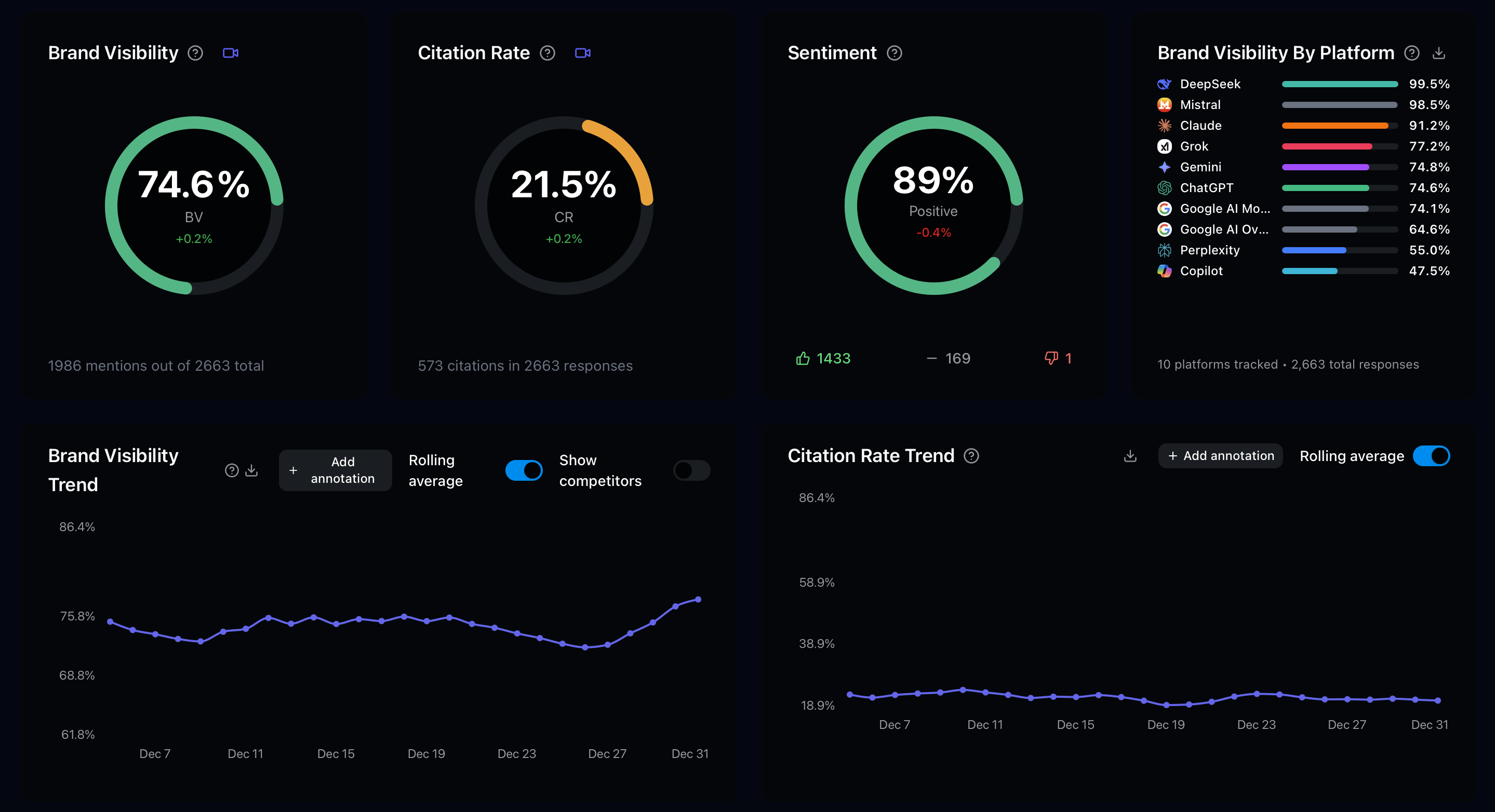
1. Create your first brand in Superlines
Log in to analytics.superlines.io → Brand Settings → Add Brand. Enter your brand name, website, country, and 2-4 competitors. Superlines auto-generates relevant prompts and starts tracking within 24 hours.
2. Connect the Superlines MCP server
Pick the tool you already use:
-
Claude Desktop —
Settings → Developer → Edit Config, then add:{ "mcpServers": { "superlines": { "command": "npx", "args": ["-y", "@superlines/mcp-server"], "env": { "SUPERLINES_API_KEY": "YOUR_API_KEY" } } } }Restart Claude Desktop.
-
Cursor —
Ctrl/Cmd+Shift+P → View: Open MCP Settings → + New MCP Server, then add the same JSON block above. -
Claude Code — Run in your terminal:
claude mcp add --transport stdio --env SUPERLINES_API_KEY=YOUR_API_KEY superlines \
  -- npx -y @superlines/mcp-server
Get your API key from Superlines Organization Settings → API Keys. It starts with sl_live_. After you connect, always start by listing your brands and then copy the exact name value returned by Superlines into follow-up prompts. This matters when multiple brands share the same brandName (for example, Superlines vs Superlines - Cookbook). Full setup guides: non-technical users | Claude Desktop with multiple servers.
3. Run your first analysis
In your connected AI tool:
List my Superlines brands. Then use the exact name of the brand I choose and show:
- brand visibility
- setup status
- top fan-out query insights
- top competitive gaps

If competitive gap data is empty, explain why and continue with the other metrics.
This gives you a reliable first success path: some brands have visibility and fan-out data before competitive gap data is populated. You now have the intelligence layer running. The paths below describe how to build on it.
Two paths to building your stack
Path A: Data-rich organizations
If your organization has established marketing data — messaging frameworks, FAQ databases, support tickets, keyword research — your stack starts with importing what you know.
Step 1: Import prompts from your existing data
Take your key marketing questions, FAQ content, and high-performing keywords. Convert them into conversational prompts and import them into Superlines. In your connected AI tool:
I have a list of keywords from our SEO tool. Convert each into a natural
conversational prompt someone would ask an AI assistant, then add them to
Superlines tracking for [Brand Name] with the label "seo-import".

Keywords: [paste list]
Organize prompts by brand, funnel stage, and competitive context using labels (funnel:awareness, funnel:decision, etc.).
Step 2: Establish a competitive baseline
For [Brand Name], use get_competitive_gap and get_fanout_query_insights to
show where competitors are winning and what content earns them citations.
This immediately reveals which competitors are winning, which content earns citations, and where the biggest opportunities are.
Step 3: Build automated analysis workflows
Create saved prompt templates for weekly competitive analysis, content audits, and strategic planning. See Automate GEO Analysis and Content Creation for six ready-to-use workflow templates.
Step 4: Add content creation
Connect a CMS via MCP and build workflows that go from analysis to content creation. Start with content briefs and graduate to full draft generation.
This path is common for larger organizations where multiple teams — brand, content, SEO, insights, PR — use the intelligence layer.
Path B: Discovery-first teams
If you’re starting without extensive internal data, your stack starts with automated discovery.
Step 1: Activate Prompt Radar and GSC integration
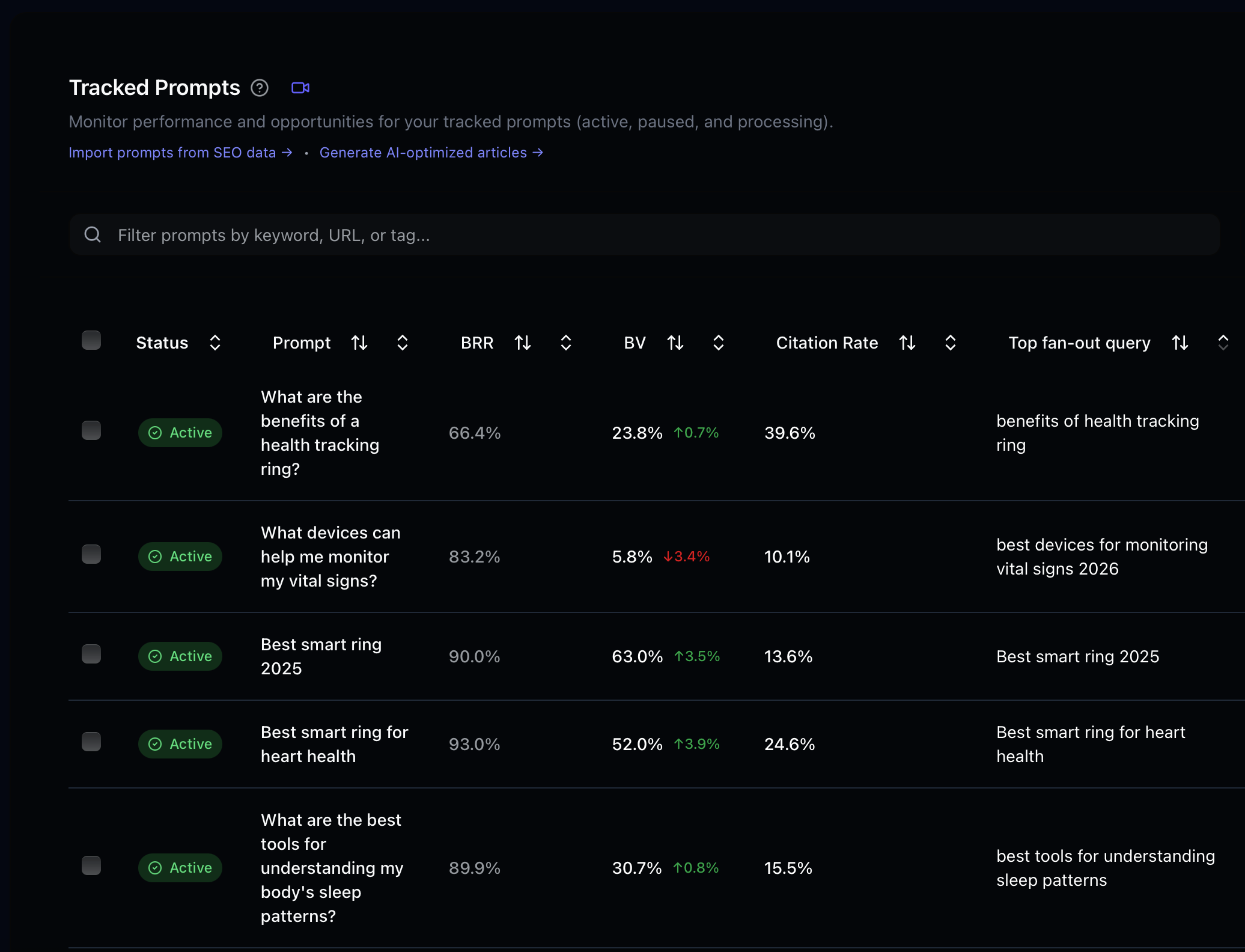
In Superlines Organization Settings → Features, toggle on Prompt Radar. In the Integrations tab, connect your Google Search Console account. Both features begin surfacing prompt suggestions within 24 hours. See the Prompt Discovery guide for step-by-step instructions.
Step 2: Use MCP for prompt discovery automation
Connect external keyword or SERP tools alongside Superlines. Build an agent workflow that discovers trending queries, checks what you’re already tracking, and adds new high-value prompts automatically.
Step 3: Analyze fan-out queries
Once you have prompts tracked, fan-out data becomes your competitive intelligence engine. See what AI models search for, which competitors win, and what content gaps exist. See the Fan-Out Query guide for workflows.
Step 4: Build the content feedback loop
Use fan-out intelligence to create targeted content. Track the impact in Superlines. Adjust and repeat.
The automation maturity curve
Most teams progress through these levels naturally:
Level 1: Manual + Dashboard (Week 1)
- Set up Superlines tracking
- Review dashboard weekly
- Use in-app agent for ad-hoc analysis
Level 2: MCP Workflows (Week 2-4)
- Connect MCP to Claude Desktop or Cursor
- Run analysis workflows with saved prompts
- Generate weekly reports automatically
Level 3: Multi-tool Automation (Month 2-3)
- Add external data sources (SERP, keywords, GSC)
- Build multi-step workflows: discover → analyze → plan
- Automate competitive monitoring
Level 4: Autonomous Pipeline (Month 3+)
- Deploy an autonomous content agent (like the AEO Pipeline)
- Daily pipeline: intelligence → analysis → content → publish → measure
- Human review on output, not on process
The outcome
A well-built AI search intelligence stack delivers four compounding benefits:
- Long-tail SEO visibility — Content created from fan-out query data and competitive analysis targets the exact queries that drive discovery
- AI brand positioning — Continuous optimization ensures your brand appears consistently and accurately across all major AI platforms
- Operational efficiency — Automation replaces hours of manual analysis and content planning with minutes of agent workflow execution
- Measurable feedback loop — Every change is tracked in Superlines, creating a data-driven optimization cycle that improves over time
The stack is not about replacing human judgment — it’s about giving your team better data, faster analysis, and more time to focus on strategy rather than execution.
Where to start
| Your situation | Start here |
|---|---|
| New to AI search | Setup Guide — get Superlines MCP running in 15 minutes |
| Need to find prompts to track | Prompt Discovery Guide — four approaches from manual to autonomous |
| Want competitive intelligence | Fan-Out Query Guide — see what AI models search and who wins |
| Ready for workflow automation | GEO Automation Guide — workflow templates for Claude and Cursor |
| Want to combine multiple tools | GEO + SEO Marketing Agent — multi-MCP server setup |
| Ready for full autonomy | Agentic AEO Pipeline — 7-phase autonomous content pipeline |